





VCA faders are among the most powerful yet misunderstood tools in modern audio mixing, offering unprecedented control over complex mixes without the routing complications of traditional methods.
VCA faders allow engineers to control the volume of multiple channels simultaneously using voltage-controlled amplifiers that remotely adjust individual channel levels without combining audio signals. Unlike a traditional sub-group or submix that sums signals together, VCA faders work like a remote control. This enables a virtual submix in which the engineer manages multiple tracks as a single unit without the phase shift often introduced by summing busses.
This approach preserves original routing while maintaining precise ratios between elements. This enables engineers to adjust drum groups, vocal sections, or instrument families while preserving their carefully crafted internal balances.
VCA technology originated in high-end analog consoles, such as the classic SSL console. It has since become standard in digital audio workstations, making professional mixing techniques accessible to all producers.
Understanding VCA faders transforms how engineers approach complex projects, from intimate singer-songwriter recordings to massive orchestral productions. This comprehensive guide explores practical implementation strategies, common pitfalls that sabotage mixes, and advanced techniques that separate amateur productions from professional releases.
Readers will discover how VCA faders solve automation challenges and streamline workflow while maintaining the sonic integrity that defines great recordings.
Key Takeaways / TL;DR
- VCA faders control multiple channels remotely without combining audio signals, preserving original routing, panning, and send ratios. This setup keeps the individual busses clear for other processing needs.
- This technology originated in analog consoles, but now provides professional mixing capabilities in all modern digital workstations.
- Proper VCA implementation streamlines complex mix automation while avoiding the phase and routing issues associated with traditional subgrouping methods.

1
What Are VCA Faders In Audio Mixing?
VCA faders represent a sophisticated remote control system that allows engineers to adjust multiple channel levels simultaneously without physically routing audio through additional buses. These voltage-controlled amplifier tools maintain individual channel integrity while providing centralized group control.
The Definition Of A VCA (Voltage Controlled Amplifier)
VCA stands for Voltage-Controlled Amplifier, originating in high-end analog mixing consoles where engineers needed to control multiple fader levels while preserving their relative balance. VCA faders work by referencing source channels and sending control messages back to adjust individual channel outputs.
The voltage-controlled amplifier operates through electrical signals that modulate gain levels across assigned channels. This provides precise gain control over the entire selection. When an engineer moves a VCA fader, it transmits voltage changes to multiple channel amplifiers simultaneously.
This technology emerged from analog mixing consoles but has been successfully adapted for digital audio workstations. Modern DAWs simulate the original voltage-control behavior using software algorithms.
VCA characteristics include:
- Remote level control without audio routing
- Proportional adjustment of assigned channels
- Preservation of individual channel processing
- Maintenance of auxiliary send ratios
How VCA Faders Differ From Group Or Bus Faders
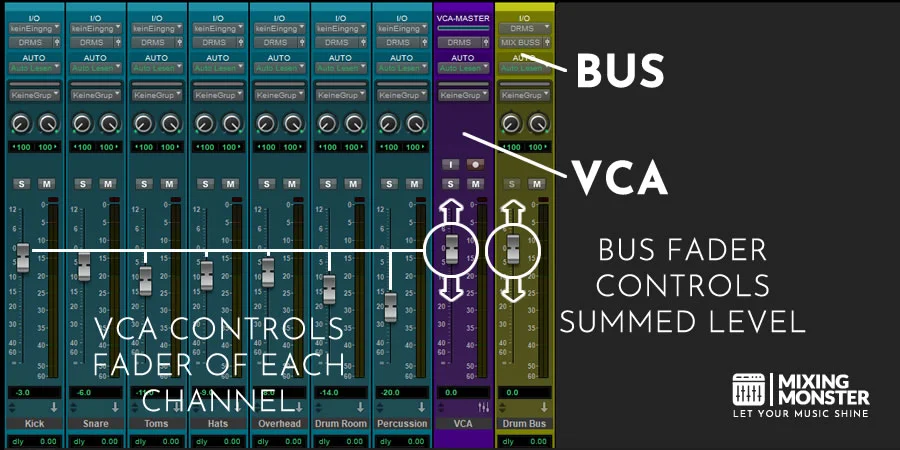
VCA faders fundamentally differ from traditional group or bus faders through their approach to signal management. While a group channel relies on a summed signal, the VCA approach maintains independent channel outputs. VCA groups allow engineers to control volume without changing routing, whereas subgroups physically combine audio signals into unified buses.
Group faders create new signal paths by summing multiple channels into a single output. This routing requires channels to be reassigned from the main mix bus to the group destination.
VCA faders maintain original signal routing while providing remote control capabilities. Each assigned channel continues sending its signal directly to the main mix bus.
Key differences:
|
VCA Faders |
Group Faders |
|
No audio routing or panning changes |
Creates new signal paths |
|
Preserves auxiliary sends |
May affect send levels |
|
Remote volume control |
Physical audio summing |
|
Maintains channel independence |
Combines signals |
Why Audio Doesn't Pass Through A VCA Fader
Audio signals never physically travel through VCA fader channels, distinguishing this technology from conventional mixing approaches. The VCA operates like a remote control system, sending commands to individual channel amplifiers without intercepting audio streams.
Individual channels maintain their original signal paths to the main stereo bus. VCA faders send control voltage to modulate the gain stages within each assigned channel's amplifier circuit.
This approach preserves signal integrity by avoiding additional conversion stages or routing complications. Engineers benefit from simplified automation while maintaining the sonic characteristics of direct channel-to-mix connections.
Signal flow advantages:
- No phase relationships altered
- Original channel EQ and dynamics preserved
- Auxiliary sends maintain proper ratios
- Reduced latency compared to bus routing
The Role Of Control Voltage In Mixing Consoles
Control voltage serves as the communication method between VCA faders and individual channel amplifiers within mixing consoles. This electrical signal carries level adjustment information without affecting the audio signal path itself.
Traditional analog mixing consoles used actual voltage variations to control amplifier gain stages. Digital mixing consoles and DAWs replicate this behavior through software control messages that achieve identical results.
The control voltage system enables proportional level changes across multiple channels simultaneously. When engineers raise a VCA fader by 3dB, each assigned channel increases by the same amount while maintaining relative balance.
Modern VCA implementation in mixing workflows provides automation capabilities that would be impractical with individual channel control. Engineers can create complex level rides across entire instrument sections with single fader movements.

2
The History And Evolution Of VCA Faders
VCA faders originated in analog mixing consoles during the 1970s as a solution to automation and control challenges. The technology evolved from hardware-based voltage-control systems to digital implementations in modern DAWs, while maintaining core functionality.
Early Use In Analog Mixing Consoles (SSL, Neve, etc.)
VCA automation emerged in the mid-1970s as the first primitive automation system for mixing consoles. Engineers needed a way to automate fader movements without the complexity and cost of motorized faders.
The original VCA system used voltage-controlled amplifiers to adjust signal levels. Two tracks of the tape machine stored automation data, allowing engineers to record and recall fader movements. The console faders themselves remained stationary during playback.
Key advantages of early VCA systems:
- Lower cost than moving fader automation
- Reliable voltage-based control
- Integration with existing analog circuitry
- Reduced mechanical complexity
SSL and other high-end console manufacturers adopted VCA technology for their flagship models. The implementation of these tools on SSL consoles revolutionized workflow for professional engineers. VCA stands for Voltage-Controlled Amplifier and originally appeared on hardware mixing desks. The system allowed one master fader to control multiple channel levels proportionally.
Large-format analog consoles benefited significantly from the implementation of VCAs. Engineers could manage complex mixes without constantly adjusting individual channel faders across expansive control surfaces.
Transition Into Digital Audio Workstations (DAWs)
Digital audio workstations adopted VCA concepts but implemented them differently from analog systems. VCA faders in DAWs allow users to control the volume of several mixer channels with a single fader.
Modern DAW VCA systems operate through software rather than voltage control. The underlying principle remains identical - one master control affects multiple assigned channels proportionally. Engineers can still access individual channel faders within VCA groups for fine adjustments.
VCA implementation in popular DAWs:
- Pro Tools: VCA Master tracks
- Logic Pro: VCA faders
- Cubase and Nuendo: VCA faders provide a dedicated track type to manage fader links. Within Cubase, users can link faders to a VCA master for streamlined group control.
- Studio One: VCA channels
Digital VCA systems offer enhanced functionality compared to analog predecessors. Engineers can automate VCA assignments, create complex routing scenarios, and integrate VCAs with plugin automation systems.
Discover Best Audio Gear & Equipment


Why VCAs Remain Relevant In Modern Mixing
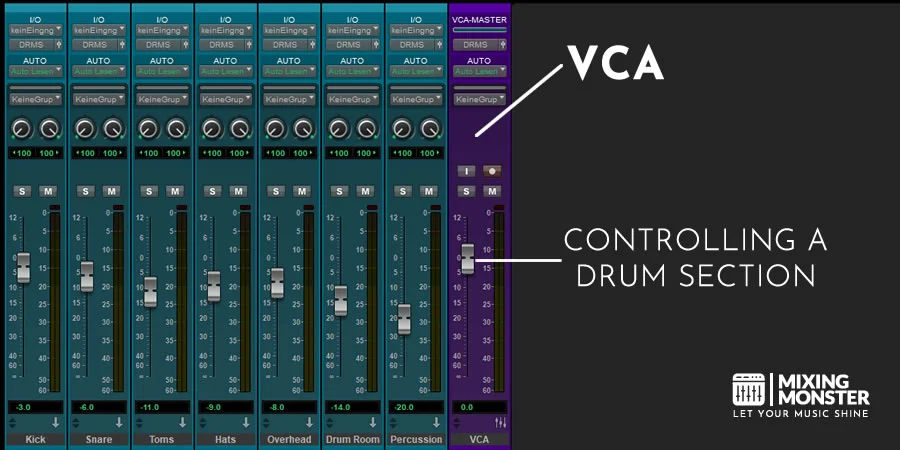
VCA faders control groups of individual faders while maintaining internal balance relationships. Engineers can adjust the overall level of instrument groups without losing carefully crafted relative balances between individual elements.
Practical applications in modern mixing:
- Drum groups: Control the entire kit while preserving individual drum balances
- Vocal stacks: Manage harmony vocals as a cohesive unit
- String sections: Adjust orchestral sections without disrupting internal dynamics
- Stem mixing: Control multiple related tracks simultaneously
VCAs excel in complex arrangements where engineers need macro-level control. Film scoring, musical theater, and large ensemble recordings particularly benefit from VCA implementation. The technology allows precise control over dense mixes without sacrificing individual channel accessibility.
Comparing VCA Faders To Automation Systems
VCA automation differs fundamentally from moving fader systems. VCA systems control signal levels through voltage or digital processing, while moving fader automation physically repositions fader controls.
VCA vs. Moving Fader Automation:
|
Feature |
VCA Faders |
Moving Fader Automation |
|
Cost |
Lower implementation cost |
Higher mechanical complexity |
|
Visual feedback |
Faders remain stationary |
Physical fader movement |
|
Reliability |
Fewer moving parts |
More mechanical components |
|
Precision |
High digital/voltage precision |
Dependent on motor accuracy |
VCA systems offer advantages in group control scenarios. Engineers can create hierarchical mixing structures where VCA masters control subgroups of channels. This approach differs from traditional automation that records individual fader movements over time.
Digital audio workstations often combine both approaches. Engineers can use VCA faders for group control while applying traditional automation to individual channels within those groups.
3
How To Use VCA Faders In Your Mix
VCA faders control multiple audio channels simultaneously while preserving individual channel levels and maintaining proper send balances. Engineers can group related tracks and adjust entire sections of their main mix with a single fader movement.
Assigning Tracks To A VCA Group
Most digital audio workstations provide multiple methods for creating VCA assignments. In Logic Pro X, engineers can select multiple tracks and right-click to create new VCA groups directly from the mixer window. Managing a track group this way allows for quick trim adjustments across the entire selection.
The VCA assignment process typically involves selecting desired audio channels first. This allows the engineer to trim the gain of a large group of tracks without touching the individual faders. Engineers then access the VCA assignment menu through mixer controls or track selection options.
Pro Tools VCA Creation:
- Add new track and select "New VCA Master"
- Assign tracks to a group using Command+G
- Link the group to the VCA fader
Logic Pro VCA Creation:
- Click blank space under VCA in mixer window
- Select "New VCA Fader" from the dropdown menu
- Multiple tracks can be assigned to a single VCA simultaneously
Controlling Multiple Channels With One Fader
VCA faders send control signals to assigned audio channels rather than processing audio directly. This fundamental difference allows engineers to maintain individual channel relationships while controlling group levels.
When a VCA fader is moved down 3dB, all assigned channels are reduced by exactly 3dB. A kick drum at -12dB and snare at -8dB become -15dB and -11dB, respectively. The 4dB difference between channels remains constant.
Individual channel adjustments remain possible within VCA groups. Engineers can modify single channels without affecting other group members. This flexibility distinguishes VCAs from auxiliary bus routing methods.
VCA Control Benefits:
- Preserves relative channel balances
- Maintains individual automation curves
- Keeps post-fader send relationships intact
- Requires minimal CPU processing power
Your Song Mixed & Mastered By Mixing Monster


Using VCAs For Vocal, Drum, Or Instrument Groups
Large mixing sessions benefit most from VCA group organization. Engineers typically create VCAs for drums, bass layers, synthesizers, strings, and vocal sections.
Drum VCA Groups: Kick, snare, hi-hats, and percussion elements work together as rhythmic units. VCA control allows quick drum level adjustments during different song sections without disrupting internal drum balances.
Vocal VCA Groups: Lead, harmony, and backing vocals benefit from grouped control. Engineers can ride vocal sections during instrumental breaks while maintaining carefully crafted harmony relationships.
Instrument VCA Groups: String sections, brass ensembles, and layered synthesizers respond well to VCA grouping. Complex arrangements with multiple similar instruments become manageable through strategic VCA assignments.
Combining VCAs With Bus Processing For Flexibility
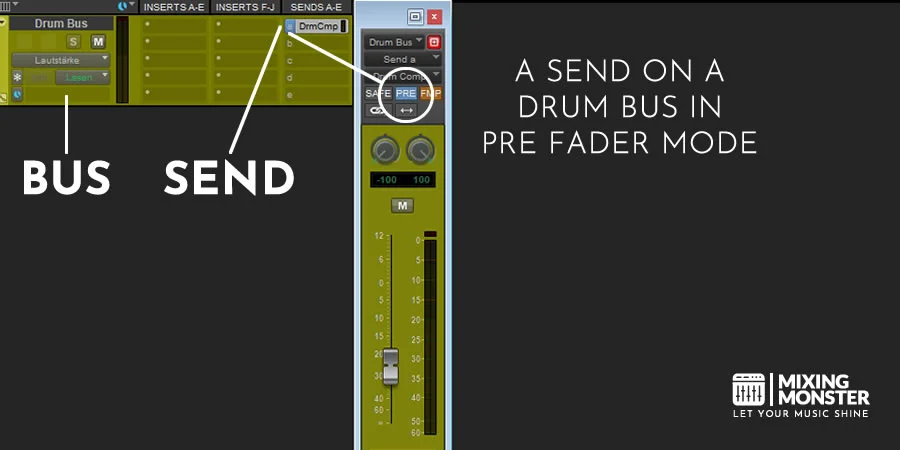
VCA faders complement auxiliary bus processing without interfering with signal routing. This is particularly useful when your session uses multiple busses for complex routing. Engineers can apply compression and EQ through auxiliary bus sends while maintaining VCA level control.
VCA faders preserve post-fader send relationships that auxiliary bus methods cannot maintain. When VCA levels decrease, reverb and delay sends reduce proportionally, maintaining wet/dry balance ratios.
Hybrid Processing Approach: Send drum group to auxiliary bus for parallel compression. Assign same drums to VCA group for level control. Both processing methods work independently without signal conflicts.
Logic Pro allows summing track stacks within folder track stacks for advanced routing. Engineers can process groups by summing stacks while controlling overall levels through VCA assignment.
This combination provides both group processing capabilities and comprehensive level control throughout the main mix.

4
Benefits Of Using VCA Faders In Audio Engineering
VCA faders deliver remote control capabilities that preserve audio signal integrity while providing proportional level adjustments across multiple channels. Engineers gain streamlined mixing workflows and enhanced automation precision without compromising individual track processing or routing configurations.
Precision And Control Without Affecting Audio Quality
VCA faders control other faders without processing the audio signal, maintaining complete signal integrity throughout the mixing process. Unlike subgroups, which combine audio signals into a single bus, VCA faders use voltage control to adjust amplification levels remotely.
The proportional control system ensures that relative balances between grouped channels remain intact during level adjustments. When an engineer moves a VCA fader, each assigned channel maintains its individual character and processing chain.
VCA faders preserve auxiliary send ratios because the control affects all channel parameters proportionally. This maintains the dry-to-wet balance of effects, sends, and other routing destinations.
Individual channel faders within a VCA group can still be adjusted independently. Engineers can fine-tune specific elements while maintaining the group's overall level control through the master VCA fader.
Improved Workflow And Faster Mix Adjustments
VCA faders streamline complex mixing sessions by consolidating control over multiple related channels into a single fader. Engineers can assign instruments by type, such as vocals, drums, or keys, creating logical groupings for efficient level management.
The remote control functionality allows rapid adjustments during critical listening phases. Engineers can ride entire instrument sections with single gestures while preserving carefully crafted individual channel balances.
Key workflow advantages include:
- Single-fader control over multiple channels
- Preserved individual channel settings
- Instantaneous group-level adjustments
- Maintained relative balances between elements
VCA groups enable engineers to make easy sense of layered audio during complex mixing scenarios. The simplified control structure reduces cognitive load and allows focus on creative decisions rather than technical operations.
Related Articles

Cleaner Automation And Session Management
VCA automation provides precise, simultaneous dynamic control over multiple channels without summing audio signals. The automation capabilities deliver sophisticated volume envelopes across entire sections while maintaining phase coherence between individual tracks.
Digital audio workstations display VCA automation graphically, showing a clear visualization of volume changes across grouped elements. This transparency helps engineers understand and modify automated moves with greater precision.
Automation benefits:
- Proportional control maintains relative channel balance
- Signal integrity preservation during automated moves
- Master control point affects all assigned channels consistently
- Individual track settings remain unaltered during group automation
VCA fader versatility shines through automation, as volume control occurs without disrupting the original signal routing. Engineers can create complex dynamic movements while preserving individual track processing and effects chains.
Flexibility In Both Live And Studio Environments
VCA faders originated from analog mixing consoles like SSL boards and translate effectively to modern digital mixing environments. The technology adapts to various mixing scenarios from tracking sessions to final mixdowns.
In live sound applications, engineers can assign all effects returns to a single VCA fader for quick muting between songs. This allows immediate control over ambient elements during performance transitions or audience interaction moments.
Studio applications benefit from VCA flexibility during different mix phases. Engineers can group elements differently for tracking, overdubs, and mixing stages without restructuring complex routing configurations.
The remote control nature of VCA faders makes them particularly valuable when managing large track counts. Engineers maintain access to individual channel controls while gaining simplified group management capabilities across complex arrangements.

5
Common Mistakes To Avoid With VCA Faders
VCA faders offer powerful mixing capabilities, but engineers often make critical errors that compromise their effectiveness. Understanding the distinction between VCA faders and routing-based solutions helps prevent signal-flow confusion and automation issues.
Confusing VCAs With Subgroup Or Bus Faders
Many engineers mistakenly treat VCA faders like auxiliary channels, creating unnecessary routing complications. VCA faders control gain at each channel strip without rerouting audio signals. Subgroup faders require audio to be routed through a bus channel before reaching the main outputs.
This confusion becomes problematic when using post-fader sends. When engineers lower a subgroup fader to zero, individual channels continue sending a signal to the reverb or delay effects through their sends. VCA faders control the actual channel levels, so lowering a VCA fader reduces both the direct signal and any post-fader send levels proportionally.
Key Differences:
| VCA Faders | Group Faders |
|---|---|
| No changes to routing | Creates new signal paths |
| Keeps aux sends intact | Can mess with send levels |
| Remote volume control | Physically sums audio |
| Each channel stays independent | Signals get combined |
Engineers should use VCA faders when they need to maintain individual channel routing while controlling group levels. Reserve subgroups for applying shared signal processing, such as compression, across multiple channels.
Overcomplicating Mixes With Too Many VCAs
Engineers frequently create excessive VCA groups, making mixing more complex rather than simpler. A typical rock song rarely needs more than four to six VCA groups: drums, guitars, vocals, keyboards, bass, and effects returns.
Creating VCA groups for every two or three channels defeats the purpose of streamlined mixing. Each additional VCA fader requires mental bandwidth to track relationships and automation interactions. Engineers should establish VCA groups only when they regularly adjust multiple related channels together.
Effective VCA grouping guidelines:
- Drums: Combine all drum elements requiring simultaneous level changes
- Vocal sections: Group lead vocals separately from backing vocals
- Instrument families: Combine multiple guitar tracks or keyboard layers
- Stem groups: Create master VCAs for major mix sections
The goal is to reduce fader movements during mixing, not creating a complex hierarchy. Engineers should start with fewer VCA groups and add more only when workflow demands require them.
Forgetting To Label Or Organize VCA Groups
Poor labeling creates confusion during mixing sessions, especially when engineers return to projects after extended periods. VCA fader channels should receive descriptive names that clearly indicate their contents and purpose.
Default names like "VCA 1" or "Link Group 2" provide no useful information about channel contents. Engineers should immediately rename VCA faders with specific descriptions: "Drum Kit," "Lead Vocals," or "Guitar Stack."
Labeling best practices:
- Use instrument-specific names rather than generic terms
- Include quantity indicators for large groups ("Drums 8ch")
- Distinguish between similar groups ("Rhythm Gtr" vs "Lead Gtr")
- Color-code VCA channels to match their controlled channels
Organization extends beyond naming to visual arrangement. VCA faders should be logically positioned on the mixing console, typically grouped or placed near their controlled channels. This visual organization speeds up mixing decisions and reduces errors during live mixing situations.
Misusing VCAs In Live Sound Scenarios
Live sound engineers often misapply VCA faders during dynamic performance situations, creating audio problems that compromise the mix. VCA faders work differently from traditional group faders, requiring different approaches for live mixing.
The primary mistake involves using VCA faders for emergency muting. When engineers need to silence problematic channels quickly, VCA muting affects all assigned channels simultaneously. This can eliminate entire instrument sections when only one channel needs attention.
Live engineers should maintain individual channel access alongside VCA control. Critical channels, such as lead vocals, should remain easily accessible on the control surface, even when assigned to VCA groups. This allows quick adjustments without affecting other group members.
Live sound VCA considerations:
- Keep individual channel strips accessible for problem solving
- Use VCA faders for gradual level changes rather than emergency cuts
- Assign backup controls for critical channels outside VCA groups
- Practice VCA operations during soundcheck to avoid performance mistakes
VCA automation can create problems during live performances when engineers accidentally engage write modes. Unintended automation recording overwrites carefully planned VCA movements, potentially ruining subsequent sections of the song.

6
Advanced Techniques With VCA Faders
VCA faders become powerful mixing tools when used beyond basic grouping functions. Nested VCA configurations allow hierarchical control of complex mixes, while automation integration creates dynamic level changes that preserve relative balances.
Layering VCAs For Hierarchical Control
Nested VCA systems create multiple control layers for complex projects. Engineers can assign individual drum microphones to dedicated VCAs for each kit piece, then route these VCAs to a master drum VCA.
This approach works particularly well for:
- Multi-microphone setups (snare top/bottom, multiple kick mics)
- Orchestral sections (strings, brass, woodwinds)
- Vocal arrangements (lead, harmonies, doubles)
The hierarchy maintains individual control while providing broader mix management. A typical drum setup might include a kick VCA, a snare VCA, and a tom VCA, all feeding into a master drum VCA.
Each channel can belong to only one Link Group, but VCA faders can be grouped. This limitation requires careful planning of the control structure.
Engineers often create three-tier systems: individual elements, instrument groups, and mix sections. This structure reduces fader count while maintaining precise control over mix balance.
Combining VCAs With Automation For Dynamic Mixes
VCA automation preserves relative channel balances while creating dynamic movement. When automation is applied to both individual channels and their controlling VCA, the automation data is summed to produce a combined level envelope.
Automation layering allows for complex level changes:
- Individual channel automation handles detailed moves
- VCA automation manages broader musical phrases
- Master VCA controls overall section dynamics
The visual representation shows thin lines for individual automation and thick lines for the combined result. This makes it easy to see how multiple automation layers interact.
Best practices for VCA automation include writing automation in passes and using the combine function to clean up data. The combine automation feature converts resultant envelopes into editable channel data.
Mute and solo automation via VCAs requires enabling write mode on both the VCA and the linked channels. This differs from level automation, which only needs VCA write mode enabled.

Using VCAs To Manage Parallel Processing Chains
Parallel processing chains benefit significantly from VCA control structures. Engineers can maintain independent control over dry signals, compressed versions, and effect returns while managing their combined output.
Common parallel setups include:
- Drum compression (dry kit + heavily compressed kit)
- Vocal processing (clean vocal + saturated double)
- Bass enhancement (DI + amplified signal)
VCAs preserve the individual send levels to effects when fader moves occur. Unlike subgroup faders, VCA faders maintain proper send effect ratios because they control the source channels directly.
This advantage becomes crucial when using post-fader sends for reverbs and delays. Lowering a VCA fader reduces both the dry signal and its contribution to time-based effects proportionally.
Setup workflow involves creating separate VCAs for each parallel chain element, then nesting them under a master VCA. This maintains blend control while providing overall level management.
Creative Applications In Sound Design And Live Mixing
Sound design applications leverage VCA flexibility for complex layered textures. VCA setups for music, Foley, SFX, and ambience tracks allow balance adjustments using just four faders.
Live mixing scenarios benefit from VCA pre-planning:
- Instrument sections grouped by frequency range
- Microphone zones for large ensembles
- Effect sends managed through VCA structures
The reduced fader count improves live mixing efficiency while maintaining creative control. Engineers can focus on musical performance rather than technical fader management.
Advanced routing combines VCAs with matrix mixing for complex live setups. Different VCA combinations can feed separate monitor mixes while maintaining front-of-house control.
Creative automation of VCA mute functions creates rhythmic effects and dramatic drops. The instantaneous nature of VCA control makes it ideal for real-time performance manipulation.

7
Key Takeaways For VCA Faders In Audio Mixing
VCA faders control multiple channels simultaneously without combining audio signals. Unlike traditional subgroups, VCA faders use voltage-controlled amplifiers to adjust individual channel levels while preserving the original routing, allowing remote adjustment.
Individual fader relationships remain intact during group adjustments. When engineers lower a VCA fader by 2dB, all assigned channels decrease by the same amount while maintaining their relative balance.
Send effects and auxiliary ratios stay proportional. VCA faders maintain precise control over send effects because they adjust the source signal level rather than just the dry mix output.
CPU efficiency surpasses traditional aux groups. VCA groups require less processing power than aux groups, making them ideal for complex sessions with numerous tracks.
Automation capabilities extend to the master VCA fader. Engineers can automate VCA faders to create dynamic level changes across entire instrument groups during different song sections.
Complex layered sessions become more manageable. VCA faders make audio mixing much easier when dealing with multiple layers by providing centralized control over related tracks.
VCA faders appear without audio meters. Since no actual audio passes through VCA strips, they display only control elements like faders, mute, and solo buttons.
Happy VCA fading!

Frequently Asked Questions
1
How do VCA faders differ from regular channel faders in a mixing console?
Regular channel faders directly control the audio signal level of individual tracks through physical or digital amplifier circuits. Each fader adjustment affects only the volume output of its assigned channel.
VCA faders use voltage-controlled amplifiers to remotely control multiple channel levels simultaneously. The VCA master fader sends control voltage to assigned channels rather than processing audio signals directly.
VCA systems maintain relative balance between grouped channels while allowing independent adjustments. Regular faders lose this proportional relationship when channels are grouped through traditional methods.
The signal routing differs significantly between these approaches. VCA faders preserve original channel routing, effects sends, and processing chains without creating additional audio paths.
2
What are the benefits of using VCA faders in live sound reinforcement?
VCA faders provide game-changing control in large audio sessions by enabling engineers to manage multiple inputs with a single fader movement. This control method reduces operator workload during complex live performances.
Live sound engineers can ride entire instrument sections during dynamic performances. VCA control maintains individual channel processing while providing master-level adjustments for drums, vocals, or backing instruments.
Emergency muting becomes more efficient through VCA assignment. Engineers can instantly silence multiple channels during feedback situations or technical problems without hunting for individual faders.
Monitor mix management improves significantly with VCA implementation. Different VCA groups can independently control stage monitor levels while preserving the front-of-house mix balance.
3
Can you explain the signal flow when using VCA faders for subgroup mixing?
VCA faders do not process audio signals through their own signal path. Unlike a group channel, there is no summed signal created within the VCA strip itself. The audio from assigned channels maintains its original routing to the main mix bus or designated subgroups.
Control voltage flows from the VCA master to individual channel amplifiers. This voltage adjusts each assigned channel's gain while preserving the original signal integrity and routing configuration.
Individual channels retain their processing chains, auxiliary sends, and insert effects. VCA control scales these elements proportionally without disrupting established signal relationships.
The VCA master fader acts as a remote control interface. Moving this fader simultaneously affects all assigned channel levels, preserving their relative positions and processing characteristics.
4
How do VCA faders affect the automation process in a digital audio workstation (DAW)?
VCA automation provides centralized control over multiple tracks through single automation lanes. Engineers can create complex level rides across entire instrument sections without writing individual track automation.
DAWs provide graphical feedback showing volume changes across entire groups through VCA automation. This visual representation makes it easier to understand and edit automated mix moves.
Automation data remains on individual tracks even when controlled by VCA systems. This approach allows both group-level and individual track adjustments within a single automation pass.
VCA automation maintains proportional relationships between assigned tracks. The relative balance remains consistent while the master VCA creates dynamic movement across the grouped elements.
5
What is the impact of VCA faders on the overall mixdown in studio recording?
VCA implementation streamlines complex mixdown sessions by reducing the number of active faders requiring attention. Engineers can focus on musical decisions rather than technical channel management.
Mix recall becomes more reliable with VCA grouping systems. Entire instrument sections can be adjusted through master controls without disturbing individual channel relationships or processing settings.
VCA groups preserve individual track character while providing section-level control. This approach maintains sonic detail that might be lost in traditional subgroup-summing methods.
Final mix adjustments happen more efficiently through VCA masters. Last-minute level changes affect entire sections proportionally without requiring multiple individual fader movements.
6
How does VCA grouping enhance workflow in large-scale mixing projects?
Large-scale projects with numerous tracks benefit from VCA organization systems. Engineers can create logical groupings that reflect musical arrangements rather than technical routing requirements.
VCA integration enables more efficient mixing while preserving audio coherence across grouped elements. This approach reduces cognitive load during complex mixing sessions.
Multiple VCA layers can be created for different mixing stages. Rough mix VCAs handle broad strokes while detailed VCAs manage subtle section balances within the overall arrangement.
Collaboration improves when VCA systems are used in large projects. Multiple engineers can work on different VCA groups without affecting other sections of the mix.