






When a voice suddenly sounds deep, rich, and almost unnaturally warm through a microphone, the proximity effect is at work.
The proximity effect is an acoustic phenomenon in which low frequencies are emphasized when a sound source moves closer to a directional microphone, typically within 6 to 12 inches of the diaphragm. This occurs specifically with microphones that use pressure-gradient transduction, such as cardioid, figure-8, and other directional patterns.
The effect results from the way these microphones detect sound pressure differences between the front and back of the diaphragm. As distance decreases, low-frequency sounds create larger pressure differentials, leading to a bass boost.
Understanding how the proximity effect works in electromagnetics shares many of the same principles of field interaction, though the audio application involves sound waves rather than electromagnetic fields.
This characteristic shapes vocal recordings across podcasts, radio broadcasts, and music production. Engineers and performers who understand how microphone distance affects tonal balance can either harness the warmth for intimacy or avoid muddiness when clarity matters most.
The sections ahead explore which microphones exhibit this behavior, how to control it during recording sessions, and when to embrace it as a creative tool rather than a technical obstacle.
Key Takeaways / TL;DR
- The proximity effect causes bass frequencies to increase as a sound source approaches directional microphones.
- Different microphone polar patterns exhibit varying degrees of proximity effect, with omnidirectional mics showing none.
- Proper mic technique and positioning allow engineers to either enhance vocal warmth or maintain natural frequency response.

1
What Is The Proximity Effect?
The proximity effect creates a noticeable bass boost when a sound source moves closer to certain types of microphones. This phenomenon affects how vocals and instruments are recorded, with the low-frequency response increasing dramatically at shorter distances.
Definition Of The Proximity Effect In Audio Recording
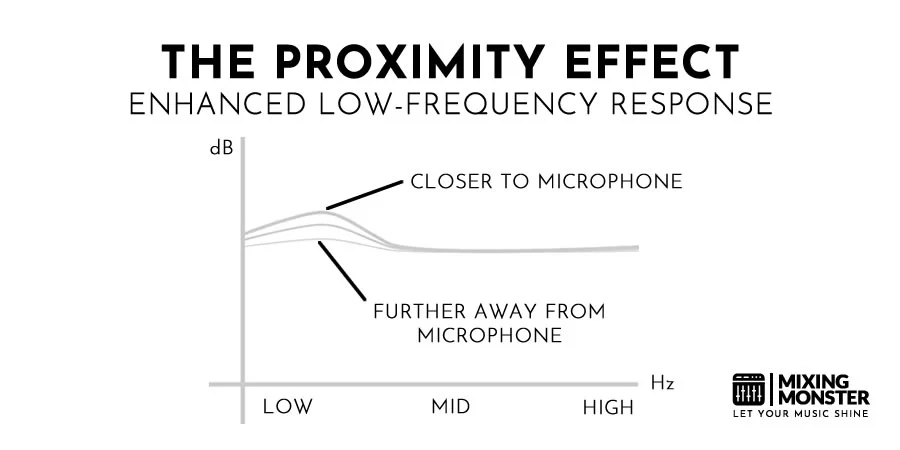
The proximity effect is a phenomenon that increases the low-frequency response as a microphone moves closer to the sound source. The closer the distance, the more pronounced the bass boost becomes.
This effect primarily impacts frequencies below 200 Hz. Male voices benefit most from this boost due to their lower fundamental frequencies, while female voices show less dramatic changes. The proximity effect can enhance recordings by adding warmth and depth, or it can create problems when excessive bass makes vocals sound muddy and unclear.
Radio personalities and vocalists often use the proximity effect intentionally to create richer, fuller vocal tones. Recording engineers position microphones at specific distances to control the amount of bass enhancement. Acoustic guitars demonstrate this effect clearly, often sounding overly boomy when microphones are placed too close to the sound hole.
The effect opens creative possibilities for shaping tone during recording rather than relying solely on post-production equalization. Bass-heavy instruments like kick drums and bass guitars can achieve a powerful low-end presence through strategic microphone placement that maximizes the proximity effect.
Why Directional Microphones Create The Proximity Effect
The proximity effect occurs exclusively in pressure-gradient transducers, which respond to the difference in sound pressure between the diaphragm's front and back. Omnidirectional microphones use pure pressure transducers and exhibit no proximity effect.
Microphone Pattern Proximity Effect Strength:
|
Pickup Pattern |
Proximity Effect Strength |
|
Figure-8 |
Strongest |
|
Cardioid |
Strong |
|
Omnidirectional |
None |
Figure-8 microphones exhibit the strongest proximity effect because they operate as pure pressure gradient transducers. Cardioid microphones combine equal amounts of pressure and pressure-gradient elements, resulting in a moderate proximity effect. This technical distinction explains why microphone selection directly impacts tonal characteristics during recording.
Multipattern microphones offer variable control over the proximity effect by switching between different pickup patterns. Engineers can select figure-8 mode to maximize bass response for thin-sounding voices or switch to cardioid for moderate enhancement. This flexibility allows real-time adjustment of low-frequency content without changing the microphone position.
How Sound Waves And Distance Influence Bass Response
Sound waves behave differently at various distances from their source. Low-frequency waves have longer wavelengths than high-frequency waves, creating pressure differentials that pressure gradient microphones detect more intensely at close range.
When a sound source sits within inches of a directional microphone, the curvature of the sound wave becomes more pronounced. The front of the diaphragm experiences significantly different pressure than the back, amplifying the microphone's sensitivity to bass frequencies. This pressure difference decreases rapidly with increasing distance.
At distances beyond 12 inches, the sound waves reach the microphone in a flatter configuration. The pressure gradient becomes less dramatic, reducing the bass boost effect. Most recording engineers work within 2 to 6 inches for vocals when they want noticeable low-end enhancement.
The relationship between distance and frequency response is not linear. Doubling the distance does not simply halve the bass response—the effect diminishes more quickly than a simple proportional calculation suggests.
Common Myths And Misconceptions About the Proximity Effect
A widespread misconception claims that multipattern microphones always produce strong proximity effects regardless of the selected pickup pattern. Research has proven this false, as multipattern microphones behave like fixed-pattern microphones with respect to the proximity effect.
Some recording engineers believe the proximity effect only affects vocals. In reality, the redistribution of electric current in electromagnetics is a distinct technical phenomenon. In contrast, in audio, the effect affects any sound source with significant low-frequency content, including guitars, brass instruments, and percussion.
Another myth suggests that expensive microphones eliminate unwanted proximity effect through superior engineering. All pressure-gradient microphones exhibit this behavior, according to the laws of physics. Quality microphones may have smoother frequency responses, but they cannot eliminate the proximity effect.
Many assume the proximity effect always degrades recording quality. Professional engineers frequently exploit this phenomenon intentionally to add warmth and presence to recordings. Understanding when to embrace or minimize the effect distinguishes skilled recording techniques from amateur approaches.

2
How Proximity Effect Impacts Sound Quality
The proximity effect fundamentally alters a recording's tonal balance by emphasizing bass frequencies when a directional microphone moves closer to a sound source. This low-frequency boost affects everything from vocal warmth to clarity, with distinct implications for speech and singing applications.
Low-Frequency Boost And Perceived Warmth
The proximity effect increases the low-frequency response as a directional microphone approaches a sound source. This bass enhancement typically becomes noticeable at approximately one meter from the source and intensifies progressively as the distance decreases.
The boosted low end adds warmth and body to recordings. Vocalists often leverage this characteristic to achieve a richer, more intimate sound quality. Male voices particularly benefit from the added chest resonance that makes recordings sound fuller and more authoritative.
The degree of bass boost depends on the microphone's polar pattern. Cardioid microphones exhibit moderate proximity effect, while figure-8 patterns show the strongest bass emphasis. Omnidirectional microphones remain unaffected, as they operate purely on pressure rather than pressure gradient.
Different sound sources respond differently to the proximity effect, depending on their radiation patterns. Bass drums behave like point sources and exhibit a continuous increase in low frequency as microphones move closer. At the same time, acoustic guitar soundboards act more like plane sources with minimal proximity effect at typical close-miking distances.

Changes In Vocal Presence And Intelligibility
Excessive bass buildup from proximity effect can reduce vocal clarity by masking mid-range frequencies. The boomy quality created by overemphasized low frequencies makes consonants harder to distinguish and reduces overall articulation.
Speech intelligibility suffers when the proximity effect becomes too pronounced. The muddy tone obscures important frequency ranges between 2 and 5 kHz, where consonant definition resides. This makes dialogue difficult to understand, especially in broadcast and podcasting applications.
Many studio microphones include high-pass filters to compensate for the proximity effect during close placement. These filters can be switched out for distant use when the natural frequency response remains balanced. Stage microphones designed for handheld use often have permanently reduced low-frequency response to counteract the inevitable proximity effect.
The performer's position relative to the microphone significantly impacts the effect's strength. Talking across the mic rather than directly into it reduces proximity effect since the bass boost primarily occurs within the figure-8 component of a cardioid pattern.
Discover Best Audio Gear & Equipment

Proximity Effect In Speech Versus Singing
Singers often embrace the proximity effect as an expressive tool. Moving closer during soft passages adds intimacy and warmth, while pulling back during louder sections maintains clarity. This dynamic technique provides natural tonal variation without processing.
Radio announcers and voice actors historically used proximity effect to create authoritative, bass-rich tones. The classic "radio voice" stems largely from the close-mic technique that exploits this phenomenon. Modern podcast hosts continue this tradition to achieve a professional-sounding vocal presence.
Speech applications require more careful management than singing. Spoken-word content prioritizes intelligibility over warmth, which can lead to excessive bass buildup. News broadcasts, audiobooks, and corporate videos typically demand flatter frequency response for consistent clarity across different playback systems.
Singing accommodates greater tonal variation, as musical context provides additional cues for understanding lyrics. The melody, rhythm, and harmonic backing help listeners comprehend words even when the frequency response becomes less balanced.
When Proximity Effect Becomes A Problem
The proximity effect can create a muddy, undefined low end that overwhelms a mix. The excessive bass requires corrective equalization that reduces recording quality and introduces phase artifacts. An untreated proximity effect makes tracks difficult to fit into dense arrangements.
Common proximity effect problems include:
- Boomy vocals that lack definition and clarity
- Inconsistent tone when performers move during recording
- Difficulty achieving proper mix balance without aggressive EQ
- Reduced headroom as low frequencies consume dynamic range
- Compatibility issues with small speakers that cannot reproduce boosted bass accurately
In noisy environments like live stages, the proximity effect actually provides benefits by discriminating wanted audio from unwanted spill. A directional microphone equalized for flat response at close range sharply attenuates low-frequency bleed from distant sources, improving isolation.
The phenomenon affects any sound source near a directional microphone, not just vocals. Instrument recordings, ambient sounds, and effects all exhibit the same bass emphasis. Engineers must understand and manage this characteristic across all recording scenarios to maintain optimal sound quality.
3
Microphone Types And The Proximity Effect
Different microphone designs interact with the proximity effect in distinct ways based on their polar patterns and internal construction. The degree of bass buildup varies significantly across directional patterns, while the fundamental difference between pressure- and pressure-gradient-capsule designs determines whether the proximity effect occurs at all.

Cardioid Microphones And Bass Buildup
Cardioid microphones combine pressure and pressure-gradient components equally, resulting in a moderate proximity effect compared to other directional patterns. When used for vocals, the closer a singer moves to a cardioid microphone, the more prominent the bass frequencies become.
The bass buildup in cardioid mics becomes noticeable at approximately one meter from the source and increases steadily as the distance decreases. Many studio cardioid microphones include switchable high-pass filters to compensate for the low-frequency boost that occurs with close placement.
Stage microphones with cardioid patterns are often designed specifically for close-up use, with their low-frequency response curtailed through acoustical design or transformer specifications. This pre-compensation helps prevent muddy or boomy sound quality when performers work the mic at typical handheld distances of 2-5 centimeters.
Figure-8 And Hypercardioid Proximity Characteristics
Figure-8 microphones exhibit the most pronounced proximity effect among all polar patterns because they operate purely on pressure-gradient principles. Both sides of the diaphragm remain exposed to sound waves, maximizing the contribution of the inverse square law at low frequencies.
Hypercardioid microphones fall between cardioid and figure-8 patterns in terms of proximity effect intensity. Their greater directionality compared to standard cardioid designs results in a stronger pressure-gradient component, translating into a more dramatic bass boost at close distances.
The figure-8 pattern's proximity effect provides useful side-rejection benefits in noisy environments. Low-frequency spill from off-axis sources receives less boost than on-axis sources, helping isolate the intended sound even when bass frequencies would normally travel farther.
Your Song Mixed & Mastered By Mixing Monster


Dynamic Versus Condenser Microphones
Both dynamic and condenser microphones experience proximity effect when built with directional polar patterns, as the phenomenon depends on the pressure-gradient principle rather than transducer type. The capsule design and polar pattern determine proximity behavior, not whether the microphone uses a moving-coil or a capacitor element.
Dynamic microphones designed for live vocal use typically incorporate built-in bass rolloff to counteract proximity effect at typical working distances. Condenser microphones intended for studio use often feature switchable filters, giving engineers the flexibility to address proximity effect during tracking or to preserve the full frequency response.
Large-diaphragm condenser microphones with switchable polar patterns allow users to control proximity effect by changing between omnidirectional, cardioid, and figure-8 modes. Selecting omnidirectional eliminates the proximity effect, while figure-8 maximizes it for creative bass enhancement.
Why Omnidirectional Mics Avoid Proximity Effect
Omnidirectional microphones measure air pressure rather than pressure gradients, making them immune to proximity effect. Their diaphragms are open to sound on only one side, functioning like fast-acting barometers that respond to absolute pressure rather than pressure differences.
The absence of the proximity effect makes omnidirectional microphones valuable when a consistent frequency response is required regardless of source distance. Recording engineers often choose omnidirectional patterns when capturing natural room ambiance or when performers move during takes.
An omnidirectional microphone maintains the same bass response whether positioned one centimeter or one meter from the source. This predictability simplifies recording techniques for instruments or vocalists who cannot maintain fixed mic positions throughout a performance.

4
Managing Proximity Effect In Recordings
Controlling bass buildup and maintaining tonal consistency requires strategic microphone positioning, frequency management tools, performer awareness, and consideration of the recording environment. Small distance adjustments can dramatically alter the low-frequency response in directional microphones.
Proper Mic Placement And Distance Control
The most direct method for managing the proximity effect involves maintaining an optimal distance between the microphone and the sound source. For vocal recordings, a range of 6-12 inches typically provides balanced frequency response without excessive bass buildup.
Engineers should mark the floor or use visual cues to help performers maintain consistent positioning. Pop filters serve dual purposes: reducing plosives and providing a physical reference point for distance control.
Distance Guidelines:
- Close positioning (2-4 inches): Maximum bass enhancement, intimate sound
- Standard positioning (6-12 inches): Balanced frequency response for most applications
- Distant positioning (12+ inches): Minimal proximity effect, more room ambiance
When singers constantly move closer and farther from directional microphones, they create inconsistent tonal shifts throughout the recording. Engineers can address this by coaching performers on microphone technique or selecting alternate mic positions that reduce movement impact.
Using High-Pass Filters And EQ Effectively
High-pass filters remove unwanted low-frequency energy that accumulates from the proximity effect. Setting the filter between 80-120 Hz for vocals eliminates rumble and mud without sacrificing warmth.
Engineers can apply these filters during tracking or in post-production. Real-time filtering during recording prevents preamps from being overloaded by excessive low-end information.
EQ strategies for proximity effect management:
- Apply gentle high-pass filter slopes (6-12 dB/octave) to preserve natural warmth
- Reduce specific problem frequencies between 150-300 Hz with narrow cuts
- Avoid boosting high frequencies to compensate for excessive bass
- Use multiband compression to control dynamic low-frequency variations
Modern plugins offer proximity effect correction specifically designed for directional microphones. These tools analyze frequency response patterns and apply targeted adjustments based on the microphone type and estimated distance.
Related Articles
Vocal Technique Adjustments For Consistent Tone
Performers play a crucial role in managing the proximity effect through deliberate technique modifications. Backing away from the microphone during louder passages and moving closer for softer sections helps maintain even tonal balance.
Singers can work the microphone by adjusting their distance based on the desired emotional impact. Moving closer creates intimacy and vocal warmth for ballads, while increased distance suits brighter, more present tones.
Technique considerations:
- Maintain consistent head position and avoid side-to-side movement
- Angle slightly off-axis to reduce plosives while controlling bass response
- Practice distance changes during rehearsal to develop muscle memory
- Communicate with the engineer about intentional proximity variations
Spoken-word applications like podcasting and voiceover work benefit from deliberate use of the proximity effect. Radio DJs and voice artists achieve authoritative, announcer-style voices by working closer to the microphone.
Room Acoustics And Their Role In Proximity Effect
Recording environment characteristics interact with the proximity effect to shape the final sound. Reflective surfaces amplify low-frequency buildup by adding room modes to the proximity-enhanced bass.
Acoustic treatment reduces these interactions by controlling reflections and absorbing problematic frequencies. Bass traps in corners address standing waves that compound the proximity effect.
Small, untreated rooms pose particular challenges because they amplify resonant frequencies. These room modes, combined with the microphone's proximity response, create unpredictable bass buildup at specific frequencies.
Microphone polar pattern selection affects how room acoustics interact with the proximity effect. Cardioid patterns pick up less room sound than omnidirectional microphones, providing better isolation from environmental factors. Figure-eight patterns exhibit the strongest proximity effect and capture more of the room's ambiance from the rear lobe.
Engineers working in less-than-ideal spaces should position microphones away from walls and corners, where bass frequencies tend to accumulate. Creating distance between the sound source and reflective surfaces minimizes the combined effect of room acoustics and the microphone's proximity response.

5
Creative Uses Of Proximity Effect
The proximity effect is a powerful production tool when engineers and performers understand how to manipulate distance to enhance tone. Strategic microphone placement can add warmth, depth, and character to recordings without requiring extensive post-production processing.

Adding Intimacy To Vocals And Voiceovers
Radio DJs and voiceover artists have leveraged the proximity effect for decades to achieve their signature sound. Working 2-4 inches from a cardioid microphone creates the classic "announcer voice," with enhanced low-mid frequencies between 100 and 300 Hz.
This technique adds weight and authority to spoken word performances. Male voices particularly benefit from the added chest resonance, creating a more commanding presence. Female voices gain warmth and richness that cuts through dense mixes.
Singers use the proximity effect to shift emotional tone within a single performance. Moving closer during intimate verses creates a whisper-like quality, while pulling back during powerful choruses maintains clarity. This dynamic microphone technique requires consistent skill to avoid tonal inconsistency.
Key distance ranges for vocals:
- 2-3 inches: Maximum bass boost, intimate tone
- 6-8 inches: Moderate warmth, balanced presence
- 12+ inches: Minimal proximity effect, natural tone
Enhancing Bass Presence Without EQ
Recording engineers position microphones extremely close to kick drums and bass amplifiers to exploit the proximity effect's natural low-frequency boost. Placing a dynamic microphone 1-2 inches from a kick drum's beater creates the deep, punchy tone essential to modern rock and pop productions.
Bass guitar cabinets benefit from similar treatment. A microphone positioned directly against the speaker grille captures the fundamental frequencies with added weight. This eliminates the need for aggressive EQ boosting that can introduce unwanted noise or phase issues.
The technique proves especially valuable when recording in untreated rooms. The focused pickup pattern and bass enhancement help overcome poor acoustics. Engineers often blend proximity-enhanced close mics with distant room mics for dimensional tone.
Proximity Effect In Podcasting And Broadcasting
Podcast hosts maintain a consistent 4-6-inch distance from cardioid microphones to achieve professional broadcast-quality sound. This positioning provides enough bass enhancement for warmth without excessive boominess that requires corrective EQ.
Modern vocal production relies on the proximity effect to achieve the bold sound expected in contemporary podcasts. The technique compensates for thinner voices, making hosts sound more authoritative and engaging. Interview-style shows require both participants to maintain similar distances for tonal consistency.
Broadcasters use pop filters at these close distances to prevent plosive sounds. The filter typically sits 2-3 inches from the microphone, with the speaker positioned another 2-3 inches behind it.
Cinematic And ASMR Recording Techniques
Sound designers position microphones inches away from props and surfaces to capture exaggerated textures for film work. Controlled bass boost adds realism and emotional significance to footsteps, door closes, and object handling. The enhanced low-frequency content creates visceral impact in theater playback systems.
ASMR content creators exploit the extreme proximity effect by recording whispers 1-2 inches from sensitive condenser microphones. The technique produces the characteristic deep, tingling quality that defines the genre. Mouth sounds, tapping, and scratching gain enhanced bass response that triggers the intended sensory response.
These recordings require careful gain staging since close positioning increases the overall signal level. Performers must maintain steady distances to avoid jarring tonal shifts that break immersion.

6
Proximity Effect In Modern Recording Workflows
Modern recording environments present unique challenges in managing low-frequency buildup, whether in untreated home studios, on crowded stages, or during live-streaming sessions. Understanding how to control bass response across different scenarios helps creators achieve professional results without expensive equipment or extensive acoustical treatment.
Home Studio Challenges And Solutions
Home studios often lack the acoustical treatment found in professional facilities, making proximity effect management even more critical. Untreated rooms amplify bass frequencies through reflections and room modes, further boosting the low end when working close to directional microphones.
Vocalists recording in bedrooms or home offices should maintain a consistent distance from cardioid microphones. A pop filter positioned between the performer and the microphone serves dual purposes: it reduces plosives while providing a physical reference point for consistent positioning.
Many engineers mark optimal distances with tape or visual markers to help performers maintain proper technique throughout sessions.
Key home studio solutions include:
- High-pass filtering during tracking at 80-100 Hz to remove excessive rumble
- Positioning microphones 6-12 inches from vocalists for balanced frequency response
- Using omnidirectional microphones when room acoustics allow, eliminating the proximity effect entirely
- Monitoring with headphones to catch bass buildup before it ruins takes
Budget-conscious recordists can intentionally exploit the proximity effect to achieve a thin-sounding voice. Moving closer to the microphone adds warmth and body without the expense of expensive preamps or processors.
Live Sound And Stage Microphone Considerations
Stage microphones designed for live performance typically include built-in bass rolloff to compensate for close-up usage. These microphones assume performers will work within 2-5 centimeters of the grille, where the proximity effect would otherwise create muddy, boomy sound.
Sound engineers face the challenge of performers who constantly move relative to their microphones. When a singer steps back during quiet passages and leans in during choruses, the tonal balance shifts dramatically beyond just volume changes.
This creates an inconsistent frequency response, complicating front-of-house mixing and potentially making recordings or broadcasts sound unprofessional.
Stage microphone strategies include:
|
Issue |
Solution |
|
Excessive bass from close positioning |
Use microphones with presence peak and bass rolloff |
|
Inconsistent performer distance |
Coach performers on proper technique |
|
Stage volume bleeding into vocals |
Exploit the directional discrimination of cardioid patterns |
Professional performers learn to work the microphone, adjusting their distance based on the intensity of their delivery. Backing away during powerful notes and moving closer during softer passages helps maintain a consistent tone while controlling volume naturally.
Proximity Effect In Streaming And Content Creation
Podcasters and content creators frequently encounter proximity effect challenges when using popular USB microphones and broadcast-style mics. Many streamers position themselves extremely close to directional microphones to achieve the "radio voice" effect, which voiceover artists have exploited for decades.
This proximity boost works well for creating authoritative, warm vocal tones in controlled environments. However, it requires consistent positioning and proper room treatment to avoid overwhelming bass that fatigues listeners. Content creators who move around during streams or frequently turn their heads produce inconsistent audio quality, which can appear unprofessional.
Desktop microphone arms and shock mounts help maintain fixed positioning. Creators should position microphones slightly off-axis rather than directly in front of their mouths to reduce both plosives and excessive proximity effect. Setting microphones 4-6 inches away provides enough low-end warmth without creating boomy, muddy dialogue.
Real-time processing through streaming software should include gentle high-pass filtering around 80 Hz to control room rumble and excessive bass buildup. Dynamic microphones often work better than condensers for streaming applications because they're less sensitive to room acoustics and handling noise.
Best Practices For Consistent Results
Maintaining consistent microphone distance remains the most important factor for predictable recordings. Engineers should establish optimal positions during the sound check and mark them physically whenever possible. Even experienced performers benefit from visual references that help them maintain proper technique throughout sessions.
Different microphone polar patterns exhibit varying degrees of proximity effect based on their pressure-gradient characteristics. Cardioid microphones show moderate bass boost, while figure-8 patterns display the most dramatic effect. Omnidirectional microphones are entirely immune to the proximity effect, making them excellent choices when room acoustics permit their use.
Testing procedures for new recording situations:
- Record test takes at 2-inch, 4-inch, 8-inch, and 12-inch distances
- Compare the frequency response and choose the most balanced position
- Document the optimal distance for future sessions
- Adjust EQ settings based on the chosen working distance
Engineers working with multiple performers should consider that each person's voice interacts differently with the proximity effect. Bass-heavy voices may require greater working distances than naturally bright or thin voices. Testing individual performers helps establish personalized techniques that deliver the best results for each artist.

7
Key Takeaways For The Proximity Effect
Understanding the proximity effect gives you a significant advantage in any recording situation, whether you're tracking vocals in a home studio or mixing a live broadcast.
Here's what to keep in mind:
- Distance is your most powerful tone-shaping tool. The closer a sound source moves to a directional microphone, the more the low frequencies build up. A shift of just a few inches can dramatically change how warm, muddy, or thin a recording sounds.
- Not all microphones behave the same way. Figure-8 microphones produce the strongest proximity effect, cardioid microphones produce a moderate boost, and omnidirectional microphones produce none at all. Choosing the right polar pattern is the first step toward controlling your low-end response.
- Thin voices and rich voices need different approaches. As the video above highlights, positioning a thin-sounding vocalist closer to the microphone adds warmth and body, while a naturally boomy voice may need more distance to avoid muddiness that clashes with kick drums and bass.
- The proximity effect can work for you or against you. Used intentionally, it adds intimacy and authority to vocals, voiceovers, and broadcast performances. Left unmanaged, it creates excessive bass buildup, making recordings difficult to mix and hard to listen to.
- High-pass filters and consistent positioning are your safety net. When the proximity effect creates more low-end than you need, a high-pass filter set around 80–120 Hz clears the mud without stripping away natural warmth. Physical markers, pop filters, and performer coaching help maintain the consistent distance that keeps your recordings sounding balanced from take to take.
Happy recording!

Frequently Asked Questions
1
What is the proximity effect in microphone recordings?
The proximity effect is the increase in bass frequency response that occurs when a directional microphone moves closer to a sound source. This phenomenon occurs because of phase and amplitude differences in the sound waves reaching both sides of the microphone's diaphragm.
Directional microphones operate as pressure gradient devices, responding to differences in sound pressure between the front and back of the diaphragm. When a sound source is close to the microphone, lower frequencies create larger pressure differentials than higher frequencies, resulting in enhanced bass response.
The effect becomes more pronounced as the distance decreases. At distances of a few inches or less, the bass boost can be substantial, dramatically altering the tonal character of recordings.
2
What techniques are used to counteract the proximity effect in audio recordings?
Increasing the distance between the microphone and the sound source naturally reduces the proximity effect. Moving back even a few inches can significantly decrease unwanted bass buildup while maintaining clarity.
Applying high-pass filters during recording or mixing removes excessive low frequencies introduced by the proximity effect. These filters allow engineers to roll off bass frequencies below a certain point, restoring a balanced frequency response.
Equalization provides precise control over specific frequency ranges affected by the proximity effect. Engineers can target problematic bass frequencies and reduce them while leaving other frequencies untouched.
Some recording techniques use omnidirectional microphones, which do not exhibit the proximity effect because of their acoustic design. However, this approach sacrifices the directionality that many recording situations require.
3
Which microphones are most affected by the proximity effect?
Directional microphones experience the proximity effect, with cardioid, supercardioid, and hypercardioid patterns showing the most pronounced bass boost at close distances. These microphones operate by pressure gradient, which creates conditions for the proximity effect.
Bidirectional or figure-8 pattern microphones also exhibit significant proximity effect. The dual-sided pickup pattern means sound waves reach both sides of the diaphragm, creating pressure differentials that enhance low frequencies.
Omnidirectional microphones do not experience the proximity effect because they respond to absolute sound pressure rather than pressure gradients. These microphones have a single diaphragm opening and maintain a consistent frequency response regardless of source distance.
Both dynamic directional microphones and condenser directional microphones exhibit the proximity effect. The phenomenon relates to the acoustic design principle rather than the transducer type itself.
4
How can I reduce the proximity effect without changing microphones?
Adjusting microphone placement provides the most direct method to reduce proximity effect. Moving the microphone farther from the sound source decreases the pressure gradient differential that causes bass buildup.
Using equalization to cut low frequencies compensates for the proximity effect while maintaining close microphone placement. A gentle roll-off starting around 100-200 Hz often restores natural tonal balance without sacrificing presence.
Some microphones include built-in bass roll-off switches specifically designed to counteract the proximity effect. These switches typically provide 6-12 dB of attenuation at lower frequencies, allowing performers to work close to the microphone without excessive bass.
Pop filters and windscreens do not reduce the proximity effect itself but help manage plosives and wind noise that often accompany close-miking situations. These accessories address different acoustic problems that may occur simultaneously with the proximity effect.
5
Does the proximity effect affect live sound differently than studio recordings?
Live sound applications often embrace the proximity effect deliberately to achieve fuller, more powerful vocal tones. Performers working close to microphones gain added low-end warmth, helping vocals cut through band mixes.
Studio recordings typically require greater control over proximity effect, as engineers aim for specific tonal characteristics. The controlled environment enables precise microphone placement and processing decisions tailored to the desired sound.
Live performers may vary their distance from the microphone during performance, creating inconsistent tonal changes due to the proximity effect. Sound engineers must anticipate these movements and adjust equalization accordingly to maintain balanced sound.
Studio recordings can use multiple takes and precise positioning to achieve consistent application of the proximity effect. Engineers have time to experiment with distances and make detailed adjustments that live situations do not permit.
6
Can the proximity effect be fixed completely in post-production?
Equalization in post-production can reduce excessive bass frequencies caused by the proximity effect. High-pass filters and parametric EQ allow engineers to target and attenuate problematic low-frequency buildup with precision.
However, an extreme proximity effect may be difficult to fully correct without introducing artifacts. When bass frequencies are boosted by 10-15 dB or more, reducing them can reveal noise, reduce clarity, or create an unnatural thin quality.
Dynamic EQ and multiband compression provide more sophisticated tools for addressing proximity effect in post-production. These processors can selectively reduce bass frequencies only when they become excessive, maintaining natural variation in the performance.
Prevention during recording remains more effective than correction in post-production. Proper microphone technique and placement eliminate the need for extensive processing and preserve better overall sound quality.
Related Articles
You Might Also Be Interested In