






Your audio recordings might sound hollow or thin without you realizing that comb filtering is silently destroying your sound quality. This characteristic comb filtering sound can make even professional equipment sound subpar.
Comb filtering occurs when two identical audio signals combine with a slight time delay between them, creating destructive and constructive interference that produces characteristic peaks and notches in the frequency response. This signal-processing phenomenon is named for the comb-like appearance of the frequency response graph, where regular dips and peaks create a pattern resembling the teeth of a comb.
The effect typically happens when sound adds to itself with delays between 75 microseconds and 15 milliseconds, resulting in severe notches that can dramatically alter the tonal character of audio. Audio engineers encounter this issue in various scenarios, from recording with multiple microphones to dealing with acoustic reflections in rooms.
Understanding how to identify and address comb filtering can transform mediocre recordings into professional-sounding productions. This comprehensive guide explores the technical mechanisms behind comb filtering, reveals common causes in both studio and live sound environments, and provides practical solutions for prevention and correction.
Discover advanced detection techniques, learn industry-standard remedies, and gain insights into when comb filtering can actually be used creatively as an audio effect.
Key Takeaways / TL;DR
- Comb filtering creates distinctive frequency notches when identical signals combine with small time delays
- Common causes include room reflections, multiple microphones, and improperly aligned speakers
- Prevention techniques like the 3:1 microphone rule and proper acoustic treatment eliminate most comb filtering issues

1
What Is Comb Filtering In Audio Engineering?
Comb filtering occurs when identical audio signals combine with slight time delays, creating distinctive peaks and nulls in the frequency response. This phenomenon affects sound quality through predictable patterns that audio engineers must understand and manage.
Definition Of Comb Filtering And Its Name Origin
Comb filtering happens when the same sound arrives at different times with delays typically ranging from microseconds to 20 milliseconds. The phenomenon gets its name from the distinctive appearance of its frequency response graph.
To create comb filter results, the signal is often passed through a delay line before being mixed with the original version. The delay length used in this process determines the specific frequencies where the peaks and nulls occur.
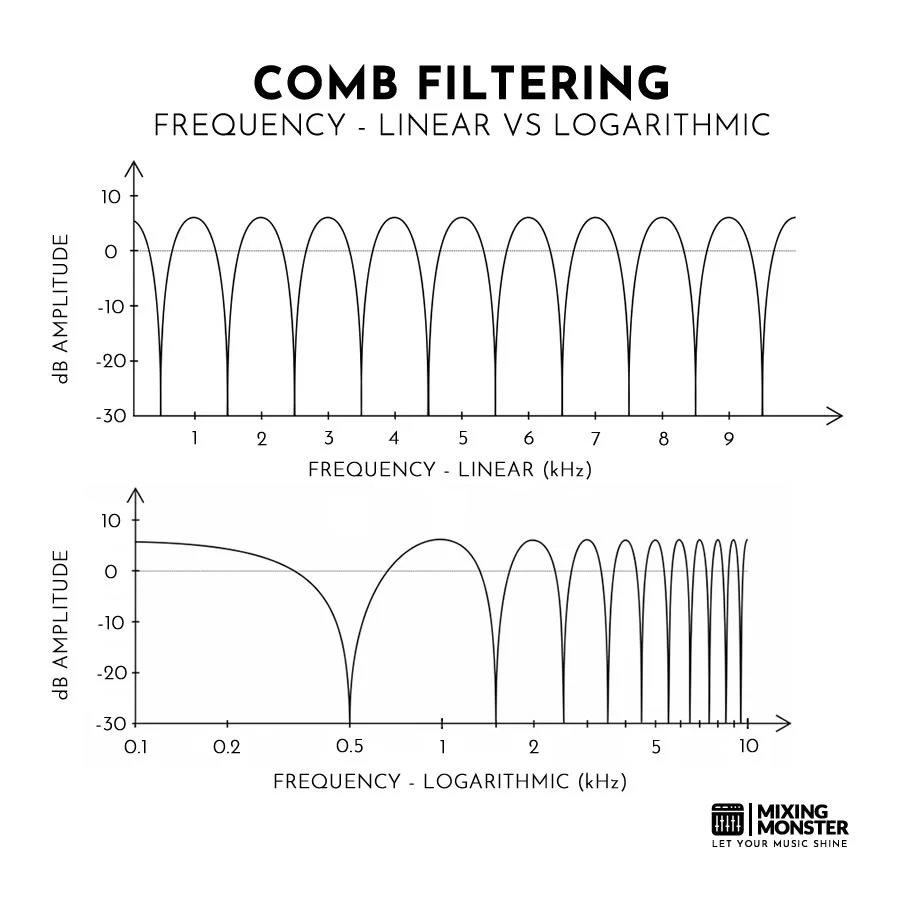
When viewed on a spectrum analyzer, the magnitude response displays alternating resonant peaks and deep nulls that resemble the teeth of a comb. These regular intervals occur because specific frequencies either reinforce each other or cancel each other out.
The delay can originate from acoustic reflections off hard surfaces or electronic processing in digital audio workstations. Audio engineers encounter this when two microphones capture the same source at different distances.
Physical reflections create natural comb filtering when sound waves bounce off walls, floors, or other surfaces before reaching microphones or listeners. In large rooms, this might manifest as acoustic echo; in smaller spaces, as tonal coloration.
Digital signal processing can replicate these effects through echo simulation techniques. By applying specific delay times, developers can recreate the complex reflection patterns found in real environments.
How Comb Filtering Appears In Frequency Response
The frequency response of comb filters exhibits a predictable pattern that depends on the delay between the signals. A feedforward comb filter is the simplest type, in which the delayed signal is added directly to the input. Shorter delays create nulls at higher frequencies, while longer ms delays affect lower frequencies.
A difference equation can describe the mathematical behavior of a feedforward comb filter. This system is a finite-impulse-response filter, where the delayed signal is added to the original signal. Mathematical relationship:
- First null occurs at frequency = 1/(2 × delay time)
- Subsequent nulls appear at odd multiples of this frequency
- Peaks occur at even multiples
A 1-millisecond delay creates the first null at 500 Hz, with additional nulls at 1.5 kHz, 2.5 kHz, and 3.5 kHz. The nulls can reach depths of 20-40 dB, dramatically altering the audio character.
The frequency response resembles a comb because in-phase frequencies sum, while out-of-phase frequencies cancel. This creates the characteristic alternating pattern of constructive and destructive interference.
Real-World Examples Of Comb Filtering In Audio
Studio environments commonly experience comb filtering when multiple microphones record the same instrument. Drum recording particularly suffers when overhead and close mics capture the same sources at different arrival times.
Live sound systems create comb filtering when speaker arrays overlap coverage areas without proper time alignment. Multiple cabinets projecting into the same space generate competing signals that interfere with each other.
Room acoustics produce natural comb filtering through reflections. Hard surfaces near microphones create delayed versions of the original signal, causing audible changes as microphones move closer to or farther from reflective surfaces.
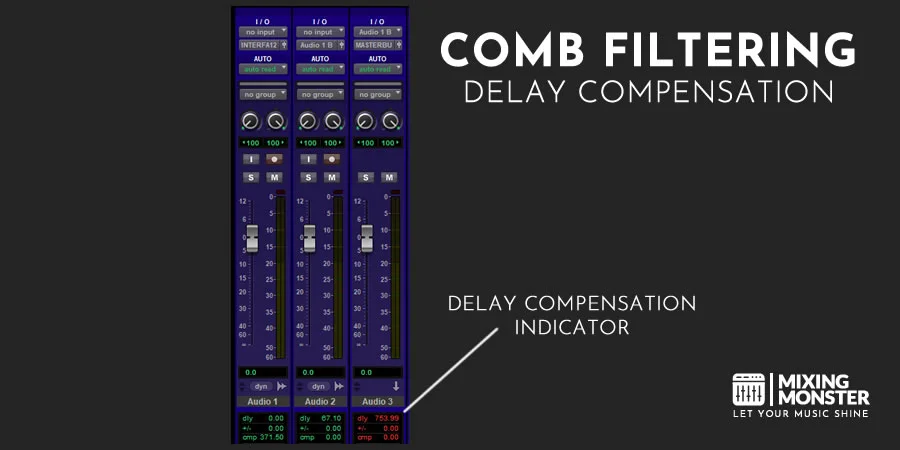
Digital audio workstations introduce comb filtering through plugin latency compensation errors or when combining processed and unprocessed signals with timing mismatches.
Why Comb Filtering Matters For Sound Quality
Comb filtering creates a hollow, unnatural sound quality that immediately signals technical problems to trained listeners. The deep nulls remove essential frequency content that defines instrument timbre and vocal clarity.
Impact on different audio elements:
- Vocals lose intelligibility and warmth
- Instruments sound thin and processed
- The mix balance becomes unpredictable
- Stereo imaging suffers from phase issues
The severity depends on the delay time and the frequency content of the source material. Broadband signals, such as drums or full mixes, show more obvious degradation than simple tones.
Professional audio engineers prioritize preventing comb filtering because it cannot be easily corrected with equalization. The multiple nulls across the frequency spectrum require specific delay compensation rather than frequency-based fixes.

2
Causes Of Comb Filtering In Audio
Comb filtering occurs when identical audio signals combine with time delays, creating characteristic frequency response patterns. The primary causes stem from differences in the physical signal path, microphone placement issues, speaker positioning problems, and digital processing delays.
Phase Interference And Time Delay Between Signals
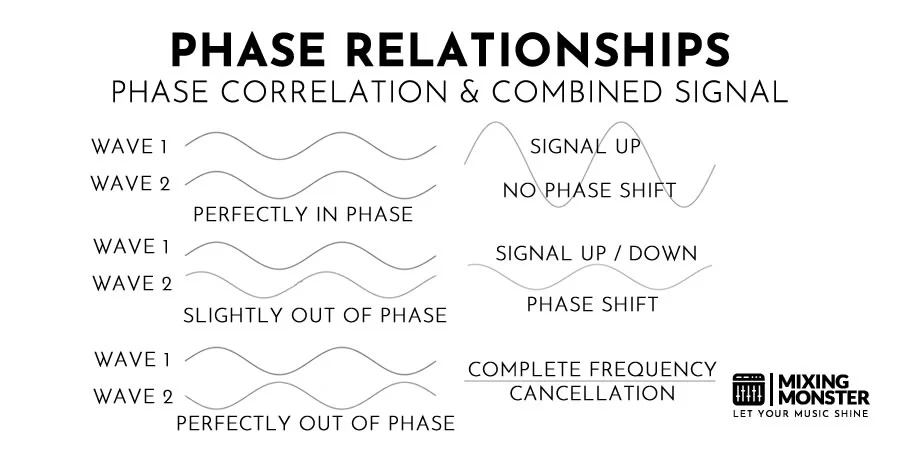
Phase interference creates comb filtering when two identical signals arrive at different times. When signals are perfectly in phase, they add together constructively, doubling the amplitude. When signals are perfectly out of phase, they cancel completely through destructive interference.
Most real-world situations produce partial phase relationships. Some frequencies align constructively while others cancel destructively, creating the comb-like frequency response pattern. The resulting comb filtering sound is often described as hollow or metallic.
Time delays between 1ms and 25ms produce the most noticeable comb filtering effects. Delays shorter than 1ms create minimal audible impact, while delays beyond 25ms begin to sound like distinct echoes rather than comb filtering.
The specific frequencies that cancel or sum depend on the exact delay length. A 1ms delay cancels frequencies whose wavelengths correspond to twice the delay distance, while reinforcing frequencies at other intervals. This interaction is the foundation of any feedforward comb filter.
Microphone Placement And Room Reflections
Room reflections cause comb filtering when sound reaches microphones through multiple paths. The direct signal travels straight from the source, while reflected signals bounce off walls, floors, ceilings, and other surfaces before reaching the microphone.
Reflective surfaces near recording setups create significant problems:
- Desktop surfaces reflect vocal recordings
- Wall reflections affect instrument miking
- Sheet music stands create additional reflection paths
- Hard flooring surfaces bounce guitar amplifier sounds
The 3:1 rule helps minimize multiple microphone interference. If one microphone sits one meter from a sound source, any additional microphones should be placed at least three meters away to reduce signal leakage and phase cancellation.
Multiple microphones recording drums often introduce comb filtering because each microphone captures drum sounds at different distances and at different times.
Discover Best Audio Gear & Equipment


Loudspeaker Positioning And Stereo Imaging
Multiple speakers producing identical signals create comb filtering when listeners are not equidistant from each speaker. Stereo systems work correctly when listeners sit exactly between left and right speakers, but most listening positions create unequal path lengths.
Common speaker-related comb filtering scenarios:
- Car stereo systems with asymmetrical seating positions
- Live sound systems with main arrays and delay towers
- Home theater systems with non-centered listening positions
- Conference rooms with distributed ceiling speakers
Sound engineers use time alignment techniques to synchronize multiple speaker arrays. They apply calculated delays to speakers farther from the audience, matching their arrival times with those of the main speakers.
Directional speaker placement reduces overlap zones where comb filtering occurs—engineers position speakers to minimize coverage overlap while maintaining adequate sound distribution throughout the venue.
Digital Processing And Latency Issues
Digital audio systems introduce processing delays that can cause comb filtering when mixed with analog signals or other digital paths with different latencies. Audio interfaces, plugins, and digital mixing consoles each introduce a small amount of processing delay.
Buffer size settings affect latency. Larger buffers reduce CPU load but increase delay times, while smaller buffers decrease latency but require more processing power.
Multiple digital effects chains processing the same signal create timing differences. Parallel processing paths through different plugins or hardware units may have varying delay characteristics, leading to phase issues when signals recombine.
Sample rate conversion processes can introduce slight timing variations between digital audio streams. When multiple converted signals mix, these microscopic timing differences accumulate into audible comb filtering.
Network audio systems face additional latency challenges as audio travels through digital networks with varying transmission delays.
3
Effects Of Comb Filtering On Sound Perception
Comb filtering creates distinctive auditory changes that alter how listeners perceive audio content. The phenomenon produces frequency-specific cancellations and reinforcements that affect clarity, tonal characteristics, and spatial perception across the frequency spectrum.
Loss Of Clarity And Definition In Audio
Comb filtering degrades audio clarity by creating multiple sharp frequency dips that remove essential harmonic content from the signal. These cancellations occur at precise frequencies determined by the delay time between the original and delayed signals.
The loss of clarity becomes most apparent in vocal recordings and acoustic instruments. When harmonics get canceled, the natural resonance and articulation of these sources disappear. Consonants in speech lose their definition, making words harder to understand.
Mid-range frequencies suffer the most noticeable clarity loss because human hearing is most sensitive in this range. Guitar solos, piano melodies, and lead vocals all experience reduced intelligibility when comb filtering affects frequencies between 1kHz and 4kHz.
The depth of the frequency notches directly correlates with clarity loss. Deeper notches create more severe degradation, while shallow dips may only cause subtle changes that listeners perceive as slight muddiness or lack of presence.
Frequency Cancellations And Boosts
The characteristic comb-shaped frequency response creates alternating patterns of cancellation and reinforcement across the audio spectrum. Frequencies cancel completely when waves arrive exactly out of phase, while others receive significant boosts when they align constructively.
Cancellation depths can reach 20-30dB at specific frequencies, effectively removing those frequencies from the audio signal. The spacing between these notches depends on the delay time - shorter delays create wider spacing between cancellations.
Low frequencies exhibit fewer, but more widely spaced, notches than high frequencies. This creates an uneven response, with some bass notes disappearing entirely while adjacent frequencies remain unaffected.
The polarity relationship between the original and delayed signals determines which frequencies experience cancellation. When signals of opposite polarity combine, they subtract at specific wavelengths.
Your Song Mixed & Mastered By Mixing Monster


Perceived Changes In Tone And Timbre
Comb filtering fundamentally alters the tonal character of audio by selectively removing or emphasizing specific harmonics. Musicians often describe the resulting sound as reminiscent of phase shifters or chorus effects, giving the audio an unnatural, processed quality.
Harmonic structure becomes disrupted when comb filtering removes fundamental frequencies or their overtones. A guitar chord may lose its warmth if the fundamental frequencies get canceled, or sound harsh if only certain harmonics survive the filtering process.
The phase shift introduced by the delayed signal creates a hollow or thin quality that many describe as "phasey." This effect becomes particularly noticeable on instruments with rich harmonic content, such as acoustic guitars, pianos, and brass instruments.
Timbral changes vary depending on which frequencies experience cancellation. High-frequency cancellations create a muffled sound, while mid-frequency notches produce a nasal or hollow character. Low-frequency cancellations result in thin, weak-sounding audio.
Impact On Stereo And Spatial Imaging
Comb filtering severely compromises stereo imaging by creating phase inconsistencies between the left and right channels. When identical signals reach each ear with different delays, the brain struggles to localize the sound source accurately.
Phantom center images become unstable or disappear entirely when comb filtering affects the stereo field. Vocals that should be centered between the speakers may seem to wander or lose focus, creating an unsettling listening experience.
The width of the stereo image can collapse as frequency-specific cancellations remove spatial cues that help define instrument placement. Drums may lose their sense of space, while background instruments become harder to distinguish within the mix.
Depth perception also suffers because the natural reverb and ambiance that create spatial depth get filtered unevenly. Some reflections cancel while others remain, creating an artificial sense of space that doesn't match real acoustic environments.

4
How To Detect Comb Filtering In Audio Systems
Detecting comb filtering requires both trained listening skills and proper measurement tools to identify characteristic frequency-response patterns. Engineers must recognize specific audible symptoms and use spectrum analyzers to visualize the telltale comb-shaped frequency dips that occur when identical audio signals mix with slight delays.

Recognizing Audible Symptoms Of Comb Filtering
The most noticeable audible symptom of comb filtering is a hollow or phasey sound quality that changes as listeners move around the listening space. This occurs because certain frequencies are either amplified or attenuated when delayed signals combine.
Engineers often describe the sound as having a "swooshy" or "filtered" character. Vocals may sound thin or distant, while instruments lose their natural timbre and presence.
Key audible indicators include:
- Frequency content that appears to shift when moving the position
- Loss of low-frequency warmth and fullness
- High frequencies that sound artificially emphasized or suppressed
- Overall, a lack of clarity and definition in the mix
The effect becomes more pronounced when the delay between signals falls within the 1-40 millisecond range. Shorter delays create higher-frequency notches, while longer delays affect lower frequencies more dramatically.
Using Measurement Tools And Analyzers
Real-time spectrum analyzers provide the most reliable method for identifying comb filtering in audio systems. The frequency response graph resembles a comb with alternating peaks and deep notches at regular intervals.
Using a spectrograph or other visual software helps identify timing issues. Essential measurement tools include:
- Real-time analyzers (RTA) - Show frequency response in real-time
- Spectrograph software - Displays frequency over time to catch phasing
- Transfer function analyzers - Measure system response with test signals
- Dual-channel FFT analyzers - Compare input and output signals directly
Engineers should look for regularly spaced notches in the frequency response. The spacing between notches indicates the delay amount: closer notches indicate longer delays, while wider spacing indicates shorter delays.
Pink noise works best as a test signal because it provides equal energy per octave across the frequency spectrum. The measurement microphone should be positioned at the primary listening position for accurate results.
Related Articles

Practical Listening Tests For Engineers
Systematic listening tests help engineers identify comb filtering when measurement tools are unavailable. The key is using familiar reference material and specific listening techniques to detect characteristic sonic artifacts.
Effective listening test procedures:
- Use mono content - Eliminates stereo imaging confusion
- Play sustained tones - Sine waves reveal notches clearly
- Test multiple positions - Move around to hear changes
- Compare mono vs stereo - Differences indicate potential issues
Engineers should use high-quality monitoring headphones to isolate the direct signal from room reflections. Critical listening material includes vocal tracks, sustained instrumental notes, and frequency sweeps.
The "hand cupping" technique helps identify reflective surfaces causing comb filtering. Engineers cup their hands behind their ears while listening to determine if reflected sound is contributing to the problem.
Specific listening cues:
- Vocals that sound distant or hollow
- Instruments missing fundamental frequencies
- Tonal balance shifts with head movement
- Lack of stereo image focus and width
Common Mistakes When Identifying Comb Filtering
Many engineers misidentify other audio problems as comb filtering, leading to incorrect solutions that don't address the actual issue. Room acoustics problems often get confused with comb filtering effects.
Frequency response issues from loudspeakers or room modes create similar-sounding artifacts but require different treatment approaches. Unlike comb filtering, these problems remain consistent regardless of listening position.
Phase cancellation between stereo channels produces hollow sounds but affects the entire frequency spectrum uniformly. Comb filtering creates specific notches at predictable frequencies based on the delay amount.
Engineers sometimes mistake microphone proximity effects for comb filtering when recording. Close-miking techniques naturally emphasize low frequencies, creating tonal changes that differ from comb filtering artifacts.
Digital processing artifacts from poorly implemented effects or sample-rate conversion can introduce frequency response irregularities. These typically occur at fixed frequencies rather than the regularly spaced pattern characteristic of comb filtering.
The most critical mistake involves attempting to fix comb filtering with equalization. EQ cannot correct the underlying delay relationship and often makes the problem worse by creating additional frequency response irregularities.

5
Solutions And Fixes For Comb Filtering
Effective comb filtering solutions focus on preventing phase interference at the source by strategically placing microphones and controlling acoustics. Digital correction methods provide additional options when physical adjustments alone cannot eliminate the problem.
Optimizing Microphone Placement Techniques
Proper microphone positioning represents the most effective approach to avoid comb filtering before it occurs. Planning your setup is the best way to prevent phase issues. The 3:1 rule states that microphones should be placed three times farther apart than they are from their intended sound sources.
For drum kit recording, engineers position overhead mics equidistant from the snare drum to ensure identical arrival times. This technique eliminates the phase differences that create comb filtering between the two channels.
Multiple microphone scenarios require careful distance calculations:
- Close mics at 6 inches from the source
- Support mics minimum 18 inches away
- Room mics positioned using delay compensation
Single microphone placement also matters when reflective surfaces exist nearby. Engineers position microphones closer to sound sources than to walls or other reflective surfaces to minimize delayed reflections.
Adjusting Speaker Positioning And Alignment
Speaker placement directly affects comb filtering in monitoring and live-sound applications. Time alignment becomes critical when using multiple speakers or speaker arrays to cover large spaces.
Professional sound systems use delay processors to ensure that sound from distant speakers arrives simultaneously with that from closer units. Digital tools measure these timing differences and apply precise corrections.
Key speaker positioning principles:
- Maintain equal distances from the listening position when possible
- Angle speakers to avoid parallel surfaces
- Use cardioid patterns to reduce off-axis pickup
- Position subwoofers to minimize phase conflicts with main speakers
Near-field monitors require specific placement relative to walls and corners. Engineers position these speakers at least 3 feet from rear walls and avoid equilateral triangle setups with reflective surfaces.
Using Acoustic Treatment To Reduce Reflections
Acoustic treatment addresses comb filtering by controlling the delayed reflections that cause phase interference. Strategically placed absorption materials eliminate problematic reflections before they reach microphones.
First reflection points receive priority treatment with absorptive panels or bass traps. These locations exist where sound bounces between the source and microphone positions.
Treatment placement strategies:
- Side walls: 2-inch thick absorptive panels
- Ceiling: Cloud panels above recording positions
- Corners: Bass traps for low-frequency control
- Behind speakers: Absorption to prevent rear-wall reflections
Diffusion provides an alternative to absorption in larger spaces. Diffusive surfaces scatter reflections rather than absorbing them, reducing comb filtering while maintaining room ambiance.
Digital Tools And Phase Correction Methods
Digital audio workstations provide several tools for correcting comb filtering after recording. Time alignment represents the primary digital solution for phase-related problems.
Engineers slide waveforms along the timeline until multiple microphone signals align perfectly. This technique requires visual waveform analysis and precise sample-level adjustments.
Available digital corrections:
- Manual time alignment: Sliding tracks by milliseconds
- Automatic phase alignment plugins: Software-based detection and correction
- Linear phase EQ: Frequency correction without additional phase shift
- All-pass filters: Phase adjustment without amplitude changes
Phase inversion buttons provide quick solutions when signals arrive 180 degrees out of phase. However, partial phase relationships require more sophisticated correction methods.
Limitation: Digital tools cannot fully restore frequency content lost to complete phase cancellation during recording.

6
Comb Filtering In Live Sound Vs. Studio Mixing
Comb filtering presents distinct challenges across different audio environments, with live sound reinforcement requiring real-time solutions while studio environments allow for precise control and post-processing corrections. Each setting requires specific approaches to prevent and manage phase interference.
Challenges In Live Sound Reinforcement
Live sound engineers face immediate comb filtering issues that cannot be fixed in post-production. Multiple loudspeakers in large venues create time alignment problems when sound from the main arrays reaches the delay speakers at different times.
Critical timing windows become crucial in live settings. Reflections arriving between 2-35 milliseconds create the most problematic comb filtering effects, particularly in the fundamental frequency range where vocals and instruments lose clarity.
Engineers must position loudspeakers to minimize coverage overlap. Point-source speakers require careful splay angles - for example, two speakers with 60-degree coverage need 60-degree spacing between them rather than side-by-side placement to prevent severe interference.
Real-time mixing decisions include:
- Delay compensation for distributed speaker systems
- Microphone placement following the 3:1 rule
- Monitor positioning to avoid feedback and phase cancellation
- Venue acoustics management through speaker directionality
Sound technicians use digital delay processors to synchronize multiple speaker zones, though perfect alignment only occurs at specific listening positions.
Studio Recording And Monitoring Issues
Studio environments offer controlled conditions where engineers can address comb filtering through precise microphone placement and acoustic treatment. Recording sessions allow for multiple takes and detailed analysis of phase relationships.
Microphone techniques become critical during tracking. Multiple microphones capturing the same source produce delayed signals that cancel each other when mixed.
The 3:1 rule applies strictly in studio work - if one microphone sits one meter from a source, the next microphone should be at least three meters away. This distance differential reduces signal correlation and minimizes comb filtering.
Studio monitoring systems require careful setup to prevent phase issues. Near-field monitors must be positioned equidistantly from the mixing position, and room reflections must be treated to prevent first-reflection interference.
Engineers use these studio-specific solutions:
- Close-miking techniques to maximize direct sound over reflections
- Acoustic panels to absorb early reflections
- Monitor isolation to prevent vibration coupling
- Phase alignment tools in digital audio workstations
Broadcast And Streaming Audio Considerations
Broadcast environments combine live and studio challenges with additional technical constraints. Multiple microphones in panel discussions create complex phase relationships that require active management.
Automix systems become essential for broadcast applications. These systems automatically adjust microphone levels to reduce the number of open channels, minimizing comb filtering when multiple speakers are present.
Streaming platforms compress audio signals, which can emphasize comb filtering artifacts. Engineers must ensure that the source material is clean before encoding to prevent amplification of phase-related issues.
Remote broadcasting introduces additional challenges:
- Satellite delays are creating timing mismatches
- Internet streaming latency is affecting live interactions
- Multiple location audio requiring synchronization
- Compression artifacts highlighting existing comb filtering
Television and radio engineers use specialized equipment, including automatic microphone mixers and real-time phase correlation meters, to monitor signal integrity.
Best Practices For Different Audio Environments
Each audio environment requires specific approaches to preventing and managing comb filtering. Live sound prioritizes immediate solutions and real-time adjustments, while studio work focuses on prevention through careful setup and post-production correction.
Equipment selection varies by application:
- Live sound uses directional speakers with controlled coverage patterns
- Studios employ precision monitors with flat response characteristics
- Broadcast facilities utilize automatic mixing consoles with built-in phase management
Acoustic treatment differs significantly between environments. Live venues focus on controlling reflections through speaker placement, while studios use absorption and diffusion materials to create controlled acoustic environments.
Mixing approaches adapts to each setting's constraints. Live engineers make quick decisions based on real-time feedback, studio engineers analyze waveforms and use precision tools, and broadcast engineers balance multiple sources with automated systems.
Sound design benefits from understanding these environmental differences, allowing engineers to choose appropriate techniques and equipment for each application while maintaining audio quality and preventing unwanted phase interference.

7
Advanced Concepts Related To Comb Filtering
Phase coherence determines how multiple audio signals align temporally, while flanging creates intentional comb filtering effects through modulated delays. Comb filtering produces distinct psychoacoustic perceptions that affect spatial awareness and frequency discrimination in listeners.
The Role Of Phase Coherence In Audio Engineering
Phase coherence describes the precise timing relationship between multiple audio signals at the same frequency. When signals remain in phase, they reinforce each other and increase amplitude.
Audio engineers must maintain phase coherence across multiple microphones to prevent unwanted comb-filtering interference. Poor phase alignment creates frequency cancellations that hollow out recordings.
Digital audio workstations provide phase alignment tools that adjust timing between tracks. Engineers can invert phase relationships to correct problematic frequency interactions.
Key phase coherence factors:
- Microphone placement distances
- Signal processing delays
- Room acoustics and reflections
- Multi-driver speaker alignment
Professional mixing requires constant phase monitoring between stereo channels. Phase meters display correlation values between -1 and +1, where +1 indicates perfect coherence.

Relationship Between Comb Filtering And Flanging
Flanging deliberately creates controlled comb filtering effects as part of creative digital audio effects. A flanger mixes the original signal with a time-delayed copy, typically ranging from 1 to 10 milliseconds.
The delay time continuously varies using low-frequency oscillation. This modulation causes the comb filter notches to sweep across the frequency spectrum.
Flanging parameters:
- Delay range: 1-10ms creates a characteristic metallic sound
- Modulation rate: 0.1-5Hz controls sweep speed
- Feedback amount: Increases resonance at notch frequencies
- Mix level: Balances dry and processed signals
Unlike accidental comb filtering, a flanger often uses feedback to emphasize the effect. The feedback loop intensifies frequency notches and creates more dramatic spectral movement. The feedback gain controls the intensity of these harmonics. This setup is often called a feedback comb filter. It functions as an infinite impulse response filter because the sound circulates back into the system.
This architecture is a fundamental component of a digital waveguide, which models the physics of strings and pipes. By carefully controlling the feedback and delay, designers can synthesize realistic instrument tones.
The classic flanger effect relies on a feedback comb filter to produce its signature sweeping sound. Classic flanging appears on guitar recordings and vocal effects. The sweeping notches produce the distinctive "jet plane" sound associated with 1970s rock productions.
Psychoacoustic Effects Of Comb Filtering On Listeners
Comb filtering significantly alters human perception of spatial positioning and tonal quality. The brain processes these frequency cancellations as unnatural hollowness or metallic coloration.
Perceptual consequences include:
- Reduced stereo width and imaging precision
- Loss of vocal intelligibility in speech
- Decreased bass response perception
- Altered sense of acoustic space
Listeners experience difficulty localizing sound sources when comb filtering disrupts natural frequency relationships. The auditory system relies on consistent spectral content for spatial processing.
Research indicates that comb filtering affects different frequency ranges uniquely. High-frequency cancellations create harshness, while mid-frequency notches cause nasal timbres.
Multiple comb filtering sources simultaneously create complex interference patterns. These interactions overwhelm the brain's ability to effectively separate individual sound sources.
Professional audio systems minimize these effects through careful acoustic design. Monitor placement and room treatment reduce reflective surfaces that cause unwanted signal delays.
Future Audio Technologies To Minimize Comb Filtering
Emerging digital signal processing techniques offer sophisticated methods for comb filtering correction. Machine learning algorithms analyze frequency responses in real-time to identify and compensate for problematic interactions.
Advanced correction technologies:
- Adaptive filtering systems that adjust automatically
- Beamforming microphone arrays with precise directional control
- Room correction software using impulse response measurements
- Predictive modeling for speaker-room interactions
Immersive audio formats like Dolby Atmos require enhanced comb filtering management across multiple channels. Object-based mixing systems track individual sound sources to prevent phase conflicts.
Cascaded integrator-comb filters in digital hardware provide computationally efficient solutions for specific applications. These filters integrate directly into audio processing chips.
Virtual reality audio demands minimal comb filtering to maintain realistic spatial cues. Head-related transfer function processing must account for natural phase relationships between ears.
Future developments focus on preventive rather than corrective approaches. Smart microphone placement algorithms and automated mixing systems will reduce the occurrence of comb filtering before it affects the final audio output.
8
Heading
Comb filtering occurs when identical sounds arrive at different times, creating frequency cancellations and reinforcements. The delay between signals ranges from one sample to 20 milliseconds.
Recognition Signs:
- Sound resembles a jet plane landing
- The frequency response shows multiple sharp dips
- Audio quality becomes thin or hollow
Common Causes:
- Multiple microphones at different distances from one source
- Hard surface reflections near microphones or speakers
- Overlapping speaker coverage in live sound systems
- Software latency when combining audio signals
The phenomenon gets its name because the frequency response pattern resembles a comb with numerous teeth-like dips.
Prevention Methods:
- Monitor microphone placement carefully during recording
- Use acoustic treatment to reduce reflections
- Check for plugin latency in digital workstations
- Align speakers properly in multi-cabinet setups
Creative Applications: Musicians and producers sometimes use comb filtering intentionally for effects similar to phase shifters or chorus pedals. Software plugins can create controlled comb filtering for sound design.
Impact on Audio Quality: Even small delays can cause dramatic changes in frequency. A 10-millisecond delay can completely alter the character of instruments like a guitar or vocals.
Understanding comb filtering helps audio professionals identify problems quickly and maintain natural sound quality in both recording and live environments.

Frequently Asked Questions
1
What causes comb filtering in audio signals?
Comb filtering occurs when identical sound waves reach a microphone or a listener's ear at slightly different times. The delayed signal can be created acoustically by reflections from hard surfaces such as walls or glass, or electronically via processing delays.
The time difference between these signals ranges from one sample to approximately 15-20 milliseconds. Beyond this threshold, the human ear perceives the delayed signal as an echo rather than comb filtering.
When these slightly offset signals combine, they create constructive and destructive interference patterns. Some frequencies reinforce each other while others cancel out completely, producing the characteristic frequency response that resembles a comb's teeth.
2
How does comb filtering affect sound quality in a recording environment?
Comb filtering creates steep frequency dips of up to 20dB, making recordings sound unnatural and hollow. These dramatic notches remove essential frequency content from instruments and vocals.
The effect becomes particularly noticeable on broadband sources like drums, acoustic guitars, or full mixes. Musical elements can lose clarity and presence as key frequencies disappear from the signal.
Different delay times shift the location of these frequency notches. This creates an unstable tonal character that changes as the phase relationship between signals varies.
3
What are common methods to identify comb filtering issues?
Visual analysis using spectrum analyzers reveals the telltale pattern of regularly spaced notches across the frequency spectrum. The resulting frequency response curve shows peaks and nulls that resemble a hair comb.
Audio professionals can identify comb filtering by listening for a hollow, phasey quality similar to a jet plane landing. The sound often exhibits a swooshing character reminiscent of chorus or phaser effects.
Real-time analyzers display these frequency patterns during recording or mixing sessions. Engineers can monitor the frequency response while adjusting microphone positions or signal routing to minimize the effect.
4
Can comb filtering be corrected during mixing?
Correcting severe comb filtering during mixing is difficult because the frequency notches are too narrow and numerous for traditional EQ. Standard equalizers cannot effectively fill in the sharp, deep cuts created by phase cancellation.
Time-alignment tools in digital audio workstations can correct electronically induced comb filtering. Engineers can adjust sample-accurate delays between tracks to restore proper phase relationships.
Prevention during recording remains far more effective than attempted correction in post-production. Proper microphone technique and acoustic treatment provide better results than mixing-stage remedies.
5
What role does room acoustics play in the occurrence of comb filtering?
Hard surfaces near microphones create reflections that cause audible delays perceived as comb filtering, similar to how light reflects off mirrors. Untreated rooms with reflective walls, floors, and ceilings are more likely to produce problematic reflections.
Room dimensions and surface materials determine the specific frequencies and delay times that create comb filtering. Parallel walls and hard floors generate particularly strong reflections that interfere with direct sound.
Acoustic treatment with absorption panels and bass traps reduces reflections. Strategic placement of these materials minimizes the acoustic paths that create delayed signals.
6
How can microphone placement help reduce the effects of comb filtering?
Using two microphones at different distances from the same source often results in comb filtering when the signals combine. The three-to-one rule helps minimize this issue by ensuring the second microphone is at least three times farther from the source than the primary microphone.
Positioning microphones away from reflective surfaces reduces the acoustic path differences that cause phase cancellation. Moving microphones closer to sources increases the direct-to-reflected signal ratio.
Strategic microphone angles can minimize pickup of reflected sound while maintaining good direct signal capture. Directional microphones pointed away from reflective surfaces help isolate the desired source from room reflections.