





Audio stems allow you to break down a complete track into separate parts, such as vocals, drums, bass, and instruments. They are individual audio files that, when combined, recreate the full mix while giving complete control over each element. This ability to isolate and adjust specific components has become essential in modern music production, DJing, and remixing.
Audio stems are grouped mixes of related sounds, such as all drum tracks or all vocal layers, exported as single files. Unlike multitracks, which provide every microphone or instrument channel separately, stems offer a more streamlined approach by consolidating these into manageable pieces. They are widely used in mixing, mastering, live performances, and even in film or video editing, where flexible sound control is needed.
With audio stems, creators can remix a song, remove vocals for karaoke, or fine-tune an arrangement for live shows. This blog will explore how stems are created, the technology behind separation tools, and how they fit into professional workflows. By the end, it becomes clear how adopting stems can simplify projects and open creative possibilities across music and media.
Key Takeaways / TL;DR
- Audio stems are grouped audio files that separate a track into key elements.
- Audio separation technology enables isolating parts of any song.
- Using stems improves flexibility in production, remixing, and live performance.

1
What Are Audio Stems?
Audio stems, also known as music stems, are grouped audio files that isolate specific elements of a track. They give music creators more control during mixing, mastering, and remixing. They allow producers and editors to adjust or replace parts of a song without altering the entire mix, making them a practical tool in modern music production.
Audio Stems: Definition and Core Concepts
An audio stem is a consolidated audio file that represents a section of a song, such as vocals, drums, or bass. Instead of handling dozens of individual tracks, stems simplify the workflow by combining related sounds into one file.
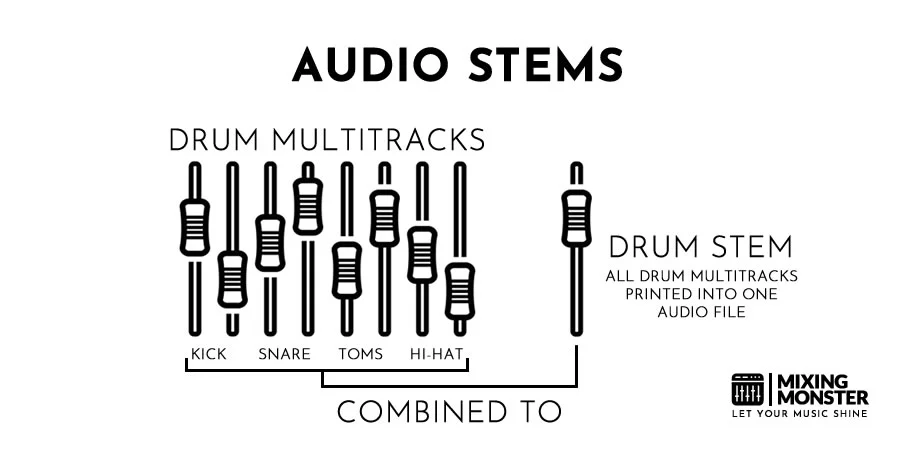
For example, a drum stem may include the kick, snare, and hi-hats mixed. When all stems are played simultaneously, they recreate the full track.
This structure helps in tasks like balancing levels, applying effects, or creating alternate versions of a song. According to Epidemic Sound, stems are often divided into four main groups: melody, instruments, bass, and drums.
By using stems, both professional engineers and independent creators can streamline editing while retaining flexibility in shaping the final sound.
Types of Stems in Music
Stems can be categorized by musical role. Common types include:
- Vocals: lead, background, or harmonies grouped together
- Drums: kick, snare, cymbals, and percussion combined
- Bass: electric, synth, or acoustic bass parts
- Instruments: guitars, keyboards, strings, or other melodic elements
Some projects may also contain stems for effects, ambient layers, or special sound design.
Stems are typically exported as stereo WAV files for high quality. However, some artists also distribute music stems as FLAC or MP3 files for easier sharing.
This makes them useful for live performances, where DJs or performers remix songs in real time using various audio stems. As Audio Network notes, stems also help video editors extend or shorten sections of a track without damaging the overall mix.
By organizing music into stems, creators can adapt a single recording for multiple uses across film, podcasts, or advertising.
Difference Between Stems and Multitracks
Stems and multitracks are related but not identical. Multitracks are the raw, individual recordings of each instrument or microphone. For example, every snare hit, tom, and cymbal may exist as separate files.
A stem, on the other hand, is a premixed group of those multitracks. A drum stem might combine all drum elements into a single stereo file, making it easier to manage.
This distinction matters in mixing and collaboration. Multitracks provide the deepest control but require more time and technical knowledge. Stems strike a balance by offering flexibility while keeping the file count manageable.
As explained by Wikipedia, stems are often used downstream in production, where engineers or editors need control over broad sections of a mix without handling every isolated track.
For most music creators, stems provide the right level of detail for remixing, mastering, and adapting songs to different media.

2
How Audio Stems Are Created
Creating audio stems involves grouping related tracks, separating them into organized files, and exporting them in formats that preserve quality. The process can be done manually within a digital audio workstation (DAW), through automated stem-splitting tools, or by carefully exporting consolidated files in standard formats for mixing, mastering, or collaboration.
Manual Stem Creation in DAWs
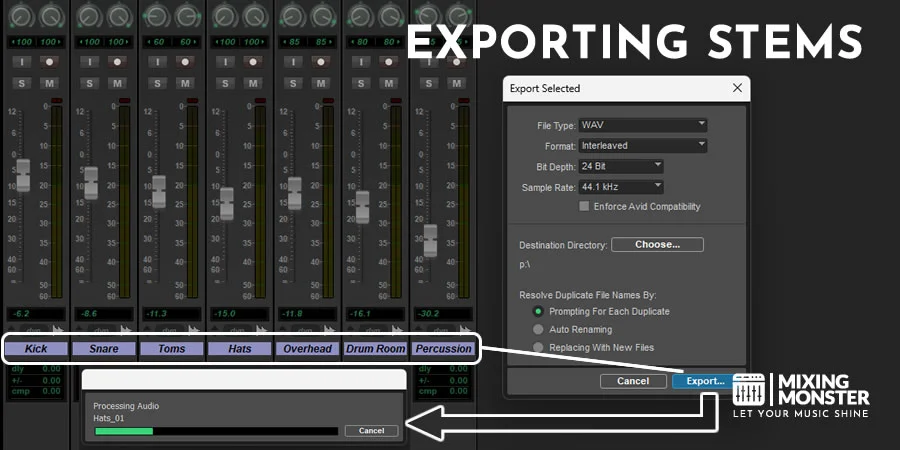
Producers often create stems manually by grouping tracks in a DAW such as Pro Tools, Logic Pro, Ableton Live, or Cubase. For example, all drum tracks may be routed to a bus channel, which is then exported as a single drum stem.
This method requires attention to detail. Engineers must ensure that effects such as reverb or delay are either included in the stem or exported separately, depending on the intended workflow.
A typical manual stem setup includes:
- Drums and percussion
- Bass
- Guitars or melodic instruments
- Keyboards and synths
- Vocals (lead and backing)
Because these stems are premixed groups, they should sound identical to the full mix when played together. This approach gives flexibility for later adjustments without requiring a complete remix.
Automated Stem Generation
Automated stem creation uses software tools that analyze a full mix and separate it into components. Popular solutions include Spleeter by Deezer, iZotope RX, and LALAL.AI. These applications apply machine learning or spectral processing to isolate vocals, drums, bass, and other elements.
This method is useful when the original project files are unavailable. For instance, a remixer may only have access to the stereo master but can still extract usable stems with automated tools.
However, results vary depending on the complexity of the mix. Dense arrangements with layered instruments may produce artifacts or bleed between stems. Engineers often use automated stems as a starting point, then manually clean them in a DAW.
Automated workflows save time but rarely match the precision of stems created directly from multitracks.
Discover Best Audio Gear & Equipment

Exporting Audio Stems and File Formats
When exporting stems, consistency and quality are critical. All stems must start at the same timecode or bar position to remain synchronized. Silence may be added at the beginning of files if an instrument enters later in the song.
The most common formats are WAV and AIFF. While these are industry standards, formats like FLAC, M4A, and OGG are also used for various storage and streaming needs. Using FLAC enables high-quality audio separation while keeping file sizes manageable for frequent stem downloaders. Recommended settings include:
- Bit depth: 24-bit (or 32-bit float for higher headroom)
- Sample rate: Match the project rate (44.1 kHz, 48 kHz, etc.)
- Channels: Stereo interleaved for most stems
Engineers typically avoid normalization, dithering, or limiting during export to preserve dynamic range. Proper naming conventions (e.g., "SongName_Vocals.wav") and including tempo or BPM in the folder help streamline collaboration and mixing workflows.
This careful preparation ensures that stems can be shared with mastering engineers, remixers, or other producers without technical issues.
3
Stem Separation Technology
Stem separation technology allows mixed audio tracks to be separated into individual components, such as vocals, drums, bass, and other instruments. These tools give producers, DJs, and educators practical ways to remix, analyze, or practice with isolated stems without needing access to original multitrack recordings.
Overview of Stem Splitters
A stem splitter is software or hardware that processes a full audio file and outputs separate tracks for individual elements. Typical stems include vocals, drums, bass, and instrumental. More advanced systems can also identify guitars, strings, and even background vocals.
This process is often used to create karaoke versions, remix stems, or study production techniques. Many musicians rely on stem splitters to separate vocals from instrumentals for sampling or rehearsal.
Stem splitters vary in design. Some are built directly into digital audio workstations (DAWs) like Logic Pro, while others are standalone apps or web-based services. The choice depends on workflow needs, costs, and supported formats.
AI Stem Splitter Tools
Modern audio separation relies heavily on AI stem splitters. These tools use machine learning models trained on large music datasets to achieve high-quality results. These models can recognize patterns in frequency and timbre to isolate instruments with greater precision than older filtering methods.
Popular tools include Lalal.ai, Moises, and AudioStrip. Each service offers different features such as background vocal isolation, noise reduction, or the ability to separate multiple instruments, like piano or guitar.
Other platforms like Gaudio Studio and LANDR Stems focus on fast, browser-based workflows. Free options, such as Ultimate Vocal Remover 5, give users the flexibility to test multiple algorithms, though they require more setup and technical knowledge.
Your Song Mixed & Mastered By Mixing Monster


Stem Accuracy and Limitations
While AI stem splitters have improved, accuracy still varies. Some tools isolate vocals cleanly but struggle with instruments that share similar frequencies, such as guitars and synths. Others may introduce artifacts like metallic ringing or phase issues.
The quality often depends on the audio material. Live recordings with reverb or crowd noise are harder to separate than studio tracks. For example, MusicTech's comparison of nine stem separation tools showed that results differ depending on the song and instrument focus.
Users should also note that processing speed, file format support, and pricing models vary widely. Many tools accept common formats like MP3, M4A, and OGG, while others require lossless FLAC or WAV files for the best audio separation results. Subscription-based services may offer convenience, while one-time payment options like Lalal.ai's credit system better suit occasional users.
In practice, many professionals combine multiple tools to achieve the cleanest results. For instance, one splitter may handle vocals best, while another produces more stable drum stems. This hybrid approach ensures flexibility when working with diverse materials.

4
Applications of Audio Stems
Audio stems allow engineers, producers, and performers to work with grouped elements of a track rather than a single stereo file. This creates flexibility in technical adjustments, creative rearrangements, and real-time manipulation of music.
Audio Stems In Mixing and Mastering
In mixing, stems provide engineers with greater control over balance and clarity. Instead of working with dozens of individual tracks, they can adjust grouped elements such as drums, vocals, or guitars. This makes it easier to fine-tune volume, EQ, and spatial placement.
During mastering, stems help address issues that a stereo file cannot. For example, if vocals sit too high in the mix, a mastering engineer can lower only the vocal stem without altering the rest of the track. This targeted processing improves consistency across playback systems.
Key benefits in mixing/mastering:
- More precise adjustments
- Cleaner overall sound
- Ability to fix problem areas without a full remix
By offering this flexibility, stems streamline workflows and enhance the quality of the final product, as noted in professional production practices.
Audio Stems In Sampling and Remixing
Stems are especially valuable for sampling and remixing because they isolate musical components. A producer can extract just the drum stem or vocal stem to build new arrangements without interference from other instruments.
For DJs and remixers, stems provide creative freedom to reimagine songs. They can rearrange sections, add effects, or combine stems from multiple tracks to create unique versions. This method preserves the integrity of the original material while allowing experimentation.
Platforms that distribute music for remix competitions often release official stems to encourage collaboration. This ensures remixers work with high-quality files rather than low-resolution audio rips.
Common uses:
- Creating alternate mixes
- Building sample packs
- DJ mashups and edits
Related Articles
Audio Stems In Live Performance Uses
Live performers and DJs use stems to adapt tracks in real time. Instead of playing a fixed stereo file, they can mute, loop, or manipulate individual stems during a set. This enables dynamic transitions and personalized renditions of a track.
Modern software and hardware controllers make stem-based performances practical. For example, a DJ might drop out the instrumental stem to highlight vocals, then reintroduce drums with added effects. This creates variety without needing multiple versions of the same track.
New formats and tools allow performers to manipulate stems in real time, offering audiences a more interactive experience.
Practical advantages:
- Greater flexibility in setlists
- Smooth adaptation to audience response
- More engaging live arrangements

5
Isolating Vocal Stems and Instrument Stems
Producers often need to isolate vocals or instruments to gain more control over a mix, create remixes, or prepare karaoke tracks. Modern AI-powered stem separation tools now make this process far more accurate than older filtering methods.
Techniques for Isolating Vocals
Vocal isolation relies on identifying frequency ranges and tonal patterns unique to the human voice. Traditional methods often used phase cancellation or EQ filtering, but these left behind heavy artifacts.
AI-driven stem splitters such as AudioCleaner's free AI stem splitter now analyze entire tracks using neural networks trained on large datasets. This allows them to separate vocals with greater clarity and reduced instrument bleed.
Producers can choose to export just the acapella stem or keep multiple stems for flexibility. Some tools, like Vocalfy's acapella extractor, focus solely on vocal clarity, making them ideal for DJs and remixers who only need the vocal track.
The quality of isolated vocals depends heavily on the original track's mix. Songs with heavy compression or layered effects can make clean separation more difficult.
Instrument Separation Methods
Instrument separation expands beyond vocals to include drums, bass, piano, guitar, and other layers. AI stem splitters like AudioPod's professional stem splitter provide multi-stem exports, giving producers detailed control over each element.
These tools work by recognizing audio signatures unique to instruments. For example, bass frequencies occupy a lower range, while cymbals and hi-hats spread across higher frequencies. Machine learning models use these distinctions to rebuild stems with minimal overlap.
Producers often separate drums to create custom rhythm tracks or isolate basslines for remixing. Karaoke creators also rely on instrumental stems to generate backing tracks without vocals.
Some platforms, such as Coolo's AI stem splitter, enable quick online processing: users upload a file and download stems in minutes. This makes the process accessible without requiring advanced audio engineering knowledge.
Challenges in Clean Stem Isolation
Despite advancements, stem separation still faces limitations. Complex mixes with heavy reverb, distortion, or dense layering can cause artifacts in the separated stems. Vocals may retain traces of instruments, and instruments may carry vocal bleed.
Processing speed also varies. Multi-stem separation usually takes longer than single vocal extraction. For instance, an acapella extractor may finish in under two minutes, while a full stem splitter may take several minutes for the same track.
Another challenge is balancing accuracy with usability. Tools designed for speed may sacrifice some clarity, while high-quality separation requires more processing power.
Producers often combine extracted stems with EQ, gating, or spectral editing to refine results. While AI tools like Voice.ai's online stem splitter reduce manual work, post-processing is still common to achieve professional-grade results.

6
Audio Stems in Music Production Workflows
Audio stems give music creators structured control over grouped elements of a mix, making it easier to adjust balance, adapt to new contexts, and collaborate across different stages of production. They allow changes without requiring full access to every track, keeping sessions organized and efficient.

Collaboration Between Producers and Artists
Stems simplify collaboration by letting producers and artists share grouped audio files instead of full multitrack sessions. A vocalist can receive an instrumental stem to record over, while a producer can send a vocal stem for feedback without exposing the entire project.
This method reduces compatibility issues since collaborators don't need identical plugins or DAW setups. For example, a producer working in Ableton can bounce stems that an engineer using Pro Tools can easily import.
Stems also help in remixing. Instead of handling dozens of raw tracks, remixers can work with a handful of stems such as drums, bass, and vocals. This keeps creative focus while preserving the integrity of the original mix.
Workflow Efficiency and Flexibility
Using stems improves efficiency by reducing the complexity of large sessions. A mastering engineer can request stems for vocals, drums, or keys to adjust levels without requiring a full remix. This approach saves time and prevents unnecessary back-and-forth.
Stems also speed up file management. Instead of sending 50 individual tracks, a producer can deliver 5–10 grouped stems. This makes exporting, importing, and organizing projects far simpler.
In professional environments, stems are often required for delivery. For instance, film and TV productions rely on stems so that dialogue, effects, and music can be balanced independently. This ensures that music does not interfere with spoken lines or sound effects during the final mix.
Creative Possibilities for Music Creators
Beyond technical uses, stems open creative opportunities. Music creators can experiment by muting, rearranging, or processing grouped elements without breaking the mix. For example, isolating a drum stem allows heavy reprocessing without affecting other instruments.
Live performers increasingly use stems to adapt songs on stage. With software tools, they can trigger or mute stems in real time, creating flexible versions of studio recordings.
Stems also support educational and practice purposes. A guitarist can rehearse with just the rhythm section stem, or a singer can practice against an instrumental stem. Platforms like Epidemic Sound highlight how stems are often divided into melody, drums, bass, and instruments, giving creators practical ways to engage with music beyond the finished track.

7
Audio Stems for DJs and Live Performances
Audio stems allow DJs to isolate and manipulate elements like vocals, drums, bass, and melodies. They provide flexibility for building transitions, creating mashups, and adapting a set to the energy of a live audience.
DJ Set Preparation and Mashups
When preparing a DJ set, stems help organize music into usable components. Instead of working with full tracks only, DJs can separate files into vocals, drums, bass, and instrumentals. This makes it easier to plan transitions or swap elements between songs.
For mashups, stems allow layering an acapella vocal over a new instrumental or combining a drum loop with a different bassline. DJs can purchase ready-made stems from platforms such as Gemtracks or extract them using software like Serato or VirtualDJ.
A simple workflow often includes:
- Collecting stem files.
- Categorizing by type (drums, vocals, bass).
- Testing combinations in rehearsal.
This preparation reduces risk during performances and expands creative options without requiring full studio production.
Real-Time Remixing
Stems enable remixing tracks live without pre-arranged edits. DJs can mute original vocals, swap drum patterns, or apply effects like filters and echoes to individual elements. Hardware such as the Rane Four or Pioneer controllers supports dedicated stem controls, while software like Rekordbox DJ or Serato offers built-in stem separation.
This flexibility lets DJs adjust the mood on the fly. For example, they can strip a track down to its percussion during a breakdown, then reintroduce vocals for impact. By rearranging stems in real time, sets feel less predictable and more adaptive to the crowd.
Using stems also improves transitions. Instead of beatmatching full tracks, a DJ can blend only the bassline of one song with the drums of another, creating smoother progressions.
Audience Engagement
Live performances benefit greatly from stems, as they allow DJs to respond directly to audience energy. A crowd may react strongly to a vocal hook, so the DJ can loop or extend that stem while layering new instrumentals underneath.
This ability to emphasize or withhold elements creates dynamic pacing. DJs can strip a track down to just drums to build tension, then drop the full mix back in for release.
Stems also encourage improvisation, making each performance unique. As Triple A Beats explains, stems enable performers to combine different elements in real time, producing results that differ from standard playback.
By tailoring mixes to the audience, DJs maintain stronger engagement and deliver sets that feel more personal and interactive.
8
Upcoming Audio Stem Technology
Rapid advances in artificial intelligence, platform integration, and new workflows are reshaping how stems are created, shared, and used. These developments affect both independent music creators and established industry professionals, offering more efficient tools and broader creative opportunities.
Advancements in AI Separation
AI-powered stem separation tools now isolate vocals, drums, bass, and other elements with greater accuracy than traditional manual editing. An AI stem splitter can process a track in seconds, compared to hours of manual work.
New platforms such as Loudly's Stem Splitter and AudioShake's separation technology allow music creators to generate professional-quality stems without original project files. This makes remixing, Dolby Atmos mixes, and immersive audio production more accessible.
These tools also reduce dependency on studio resources. For example, older recordings without preserved stems can be reimagined through AI separation, enabling new remasters and spatial mixes. The technology is not flawless—artifacts or residual noise may remain—but improvements in modeling continue to minimize these issues.
Integration with Music Platforms
Streaming services and music platforms are increasingly supporting stem-based experiences. With formats like Eclipsa Audio, listeners can interact with songs in immersive environments where stems are positioned in 3D space.
For music creators, this means stems are no longer just a production tool but also a distribution asset. Platforms can offer features such as adjustable mixes, karaoke modes, or interactive fan engagement where listeners isolate instruments or vocals.
Integration also extends to sync licensing and gaming. Stems enable adaptive soundtracks in which elements change dynamically based on gameplay or scene context. As more platforms adopt stem compatibility, creators gain new ways to monetize and present their work.
Implications for the Music Industry
The growing use of stems changes how music production and rights management operate. Labels can revisit legacy catalogs by extracting stems from older masters and creating new revenue through remastered, immersive releases.
Collaboration also becomes easier. AI-generated stems can be shared across producers, fostering remote co-creation without needing access to full project files. This supports both independent artists and larger studios.
At the same time, the industry must address licensing and ownership. When AI separates stems from an existing mix, questions arise about rights and royalties. Clear frameworks will be necessary as stem-based workflows expand into mainstream music production.
9
Key Takeaways For Managing Audio Stems
When managing audio stems, consistency is essential. Each stem should start at the same point in the timeline and share the same length to ensure proper alignment during mixing. Using a uniform file format, such as 24-bit WAV, helps maintain quality and compatibility across different systems.
Benefits of stems include:
- Easier collaboration between producers and engineers
- More control during mixing and mastering
- Flexibility for remixes, live performances, and alternate versions
A clear labeling system prevents confusion. Naming stems by instrument or group (e.g., Drums_Kick, Vocals_Lead) allows quick identification and reduces errors. This practice is especially useful when sharing files with collaborators.
Stems should be grouped logically. For example, drums, bass, and vocals can each be exported as separate stems. This approach allows producers to adjust individual sections without affecting the entire mix.
|
Stem Type |
Typical Content |
Use Case |
|
Drum Stem |
Kick, snare, percussion |
Balance rhythm section |
|
Vocal Stem |
Lead and backing vocals |
Adjust clarity and presence |
|
Instrumental |
Guitars, synths, keys |
Control harmony and texture |
|
FX Stem |
Reverbs, delays, effects |
Fine-tune spatial characteristics |
Carefully managing stems ensures a more efficient workflow. Stems streamline collaboration and provide flexibility in both creative and technical stages of production.
Happy stem separation!

Frequently Asked Questions
1
What is the best software for separating tracks into audio stems?
Several tools can split a full mix into stems. Popular options include iZotope RX, Steinberg SpectraLayers, and AI-powered platforms like Lalal.ai. These programs use advanced algorithms to isolate elements such as vocals, drums, and instruments with varying degrees of accuracy.
2
How can I isolate vocals from a mixed track using audio stems?
Vocal isolation often relies on stem separation software. Tools like iZotope RX and SpectraLayers allow users to extract vocals by analyzing frequency and phase information. Some online services also offer automated vocal extraction, though results depend on the mix's complexity.
3
What file formats are typically used for audio stems?
Stems are usually exported as high-quality WAV or AIFF files to preserve audio fidelity. These formats are uncompressed and preferred in professional production. In some cases, compressed formats like MP3, M4A, or OGG may be used for convenience or storage. However, professional music stems are best kept in lossless formats like WAV or FLAC to maintain the highest possible fidelity.
4
Can audio stems be used for live performance mixing, and if so, how?
Stems are frequently used in live settings. DJs and performers group instruments or vocals into stems so they can adjust levels, apply effects, or mute sections during a set. This approach provides more flexibility than playing back a single stereo track.
5
What are the legal considerations when using audio stems from copyrighted music?
Using stems from copyrighted songs requires permission from the rights holder. Without clearance, distributing or performing with those stems may infringe copyright law. Some artists release official remix packs or hold contests where stems are provided legally for creative use.
6
How do audio stems differ from multitracks in music production?
Stems are grouped audio files, such as all drum tracks bounced into one file, while multitracks are the individual recordings that make up a session. Stems simplify collaboration and live performance, but multitracks give engineers more detailed control during mixing.