






Achieving professional sound quality can be challenging, especially when dealing with complex mixes in a modern digital audio workstation. Mixing in mono is a powerful technique used by professional audio engineers to create clearer, more balanced tracks.
Mixing in mono forces you to focus on the fundamental elements of your mix by collapsing the stereo field into a single channel, making it easier to identify and fix balance, EQ, and phase-correlation issues.
Understanding why mixing in mono is essential for professional mixing and mastering in any genre. While mixing in stereo is the end goal, starting without the distraction of panning helps you hear the true relationship between instruments.
This technique has been used in professional studios for decades because it ensures compatibility across different playback systems. It helps create mixes that translate well by ensuring panning and stereo effects don't compromise the core audio.
Many modern producers overlook this essential technique, but mixing in mono can dramatically improve the clarity and impact of your tracks. By mastering this approach, you'll develop better mixing decisions and create music that sounds great on any system, whether it's played in stereo or mono.
Key Takeaways / TL;DR
- Mixing in mono reveals hidden balance and phase issues that stereo mixing might mask
- Regular mono checks ensure better mix translation across all playback systems
- The technique helps create clearer, more professional-sounding mixes with proper element separation

1
Understanding Mixing In Mono
Mixing in mono helps create balanced, professional mixes by forcing you to make critical decisions based on level and frequency content rather than spatial positioning. This fundamental technique remains crucial in modern music production.
What Is Mono Mixing?
Mono mixing combines all audio elements into a single audio channel. Every sound source gets centered, eliminating left-right positioning from the equation. Think of it as collapsing a wide stereo image into a single point. Learning how to mix in mono begins with understanding how your stereo field is constructed. This helps you identify which elements belong in the center and which benefit from panning. You can see how various elements interact without the distraction of width.
The process involves summing stereo tracks to mono to ensure compatibility across playback systems. This conversion from stereo to mono highlights where instruments might be clashing. Engineers use mono mixing to evaluate core mix elements like:
- Level balance between instruments
- Frequency masking issues
- Phase relationships
- EQ decisions
- Dynamic range control
Mono vs. Stereo: Key Differences
In stereo mixing, sounds can be positioned anywhere in the left-right field. While mixing in stereo can provide a lush soundscape, it can often hide underlying frequency issues. When you mix in stereo, the width can trick your ears into thinking two sounds aren't competing. Mono eliminates this dimension, forcing focus on three key aspects:
- Level: Volume relationships between elements
- Frequency: EQ and spectral content
- Time: Depth through reverb and delay
Mixing decisions become more challenging without the ability to separate elements through panning. This limitation actually strengthens the fundamental mix decisions.
Why Mono Mixing Is Important
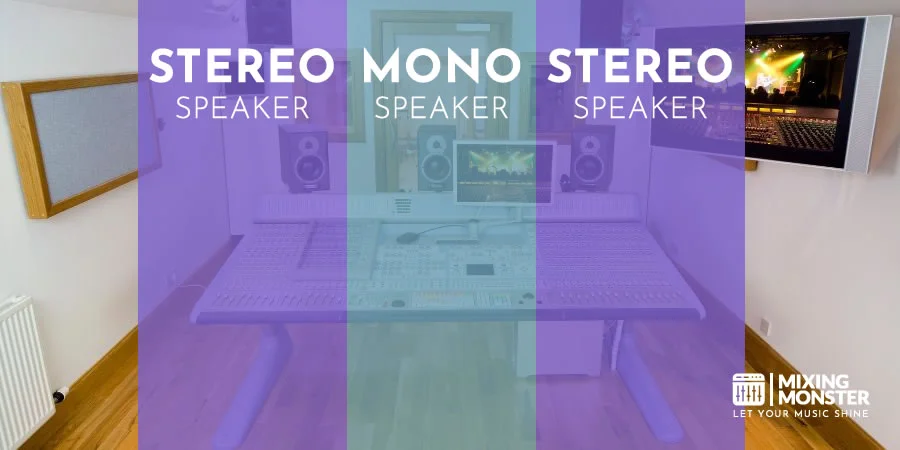
Professional mix engineers regularly check their mixes in mono to ensure compatibility across all playback systems. Many clubs, phones, and public address systems sum stereo mixes to mono. Testing your audio on mono speaker setups helps ensure your song retains its energy in these common listening environments.
Key benefits include:
- Reveals phase cancellation issues
- Exposes frequency masking problems
- Forces better gain staging
- Ensures mixed translation across systems
- Strengthens core mixing skills
Switching between mono and stereo throughout the mixing process helps create mixes that sound great in any playback scenario.

2
Benefits Of Mixing In Mono
Mixing in mono forces engineers to make better mixing decisions by eliminating spatial distractions and focusing on fundamental mix elements. This technique reveals critical mix issues that might otherwise remain hidden in stereo.
Enhanced EQ Balance And Clarity
Proper EQ decisions become essential when working in mono. Engineers must carve out specific frequency ranges for each instrument to prevent muddiness. Strategic eqing helps resolve frequency masking by giving each sound its own space.
The mono environment eliminates the false sense of separation that stereo width creates. This limitation pushes mixers to make precise frequency adjustments.
Each instrument needs its own space in the frequency spectrum. Bass and kick drums might require careful EQ around 100-200 Hz, while guitars and vocals need distinct mid-range spaces.
Phase Issue Detection
Phase cancellation problems become immediately apparent in mono. Two similar sounds that cancel each other out will cause noticeable volume drops or signal loss. This process helps you identify phasing issues that weaken your low end. Phasing occurs when waves interact in a way that reduces their combined power, making the track sound hollow.
Stereo microphone techniques, particularly on drums or acoustic guitars, can create phase issues. Mono mixing exposes these problems instantly. You might also notice comb filtering, which creates a thin, unnatural tone. Once identified, you can fix phase issues by adjusting the timing or polarity of specific tracks.
The mono mix helps identify problematic delays or modulation effects that might cause phase conflicts. You can easily spot when complex stereo effects are creating destructive interference. These issues often arise during the stereo-to-mono conversion on certain devices. Engineers can adjust plugin settings or recording techniques to resolve these issues.
Discover Best Audio Gear & Equipment


Improved Mid-Channel Control
Elements in the middle channel, such as vocals, bass, and the kick drum, need proper balancing for a professional mix. Mono mixing emphasizes these center-focused sounds.
Working in mono helps establish the correct relationship between critical mix elements. The bass guitar and kick drum balance becomes more apparent without stereo masking.
Clarity in the mid-channel improves translation across different playback systems. This attention to mono compatibility ensures the mix sounds great on phone speakers, club systems, and home stereos alike.

3
When To Use Mono Mixing
Mixing in mono helps achieve better clarity and balance in your mix. Strategic use of mono mixing at specific points in your workflow can significantly improve the final stereo output.
During Initial Mix Setup
Start your mixing session by placing a mono plugin on the master bus. This forces you to focus on establishing a clear separation between instruments through level and EQ decisions rather than relying on stereo placement.
Mono compatibility testing becomes crucial during this phase. Check that all elements remain audible and balanced when collapsed to mono.
Set up reference tracks in mono to compare against your mix. This provides a reliable benchmark for relative volume relationships between elements.
Volume And EQ Adjustments
Make critical volume decisions while monitoring in mono. Elements competing in the same frequency range become immediately apparent without the masking effect of stereo spread.
Focus on these key adjustments:
- Bass and kick drum relationship
- Lead vocal prominence
- Balance between similar instruments
- Mid-range instrument separation
Clean separation between elements relies on precise EQ choices when working in mono. Address frequency masking issues that might be hidden in stereo.
Your Song Mixed & Mastered By Mixing Monster


Final Mix Checks
Switch between mono and stereo regularly during the final stages. Pay attention to how the mix translates between both formats.
Test the mix on different mono playback systems:
- Phone speakers
- Small Bluetooth speakers
- Club sound systems
- AM radio simulation
Phase cancellation issues become obvious during mono playback. Address any elements that lose impact or disappear when summed to mono.

4
How To Use Mono Mixing Effectively
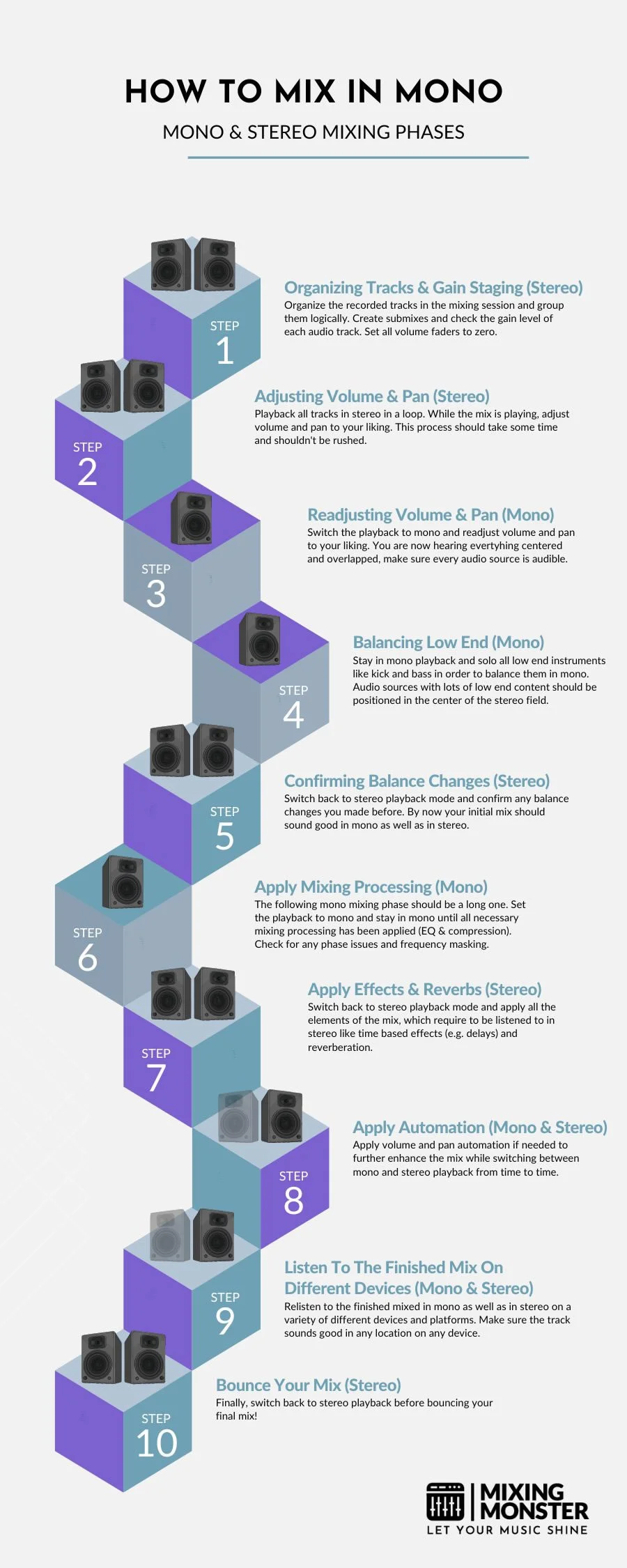
Learning how to mix in mono is a fundamental skill for any producer. Mixing in mono helps create balanced, professional-quality mixes by focusing on frequency balance and phase issues. A proper mono mix serves as the foundation for an excellent stereo mix.
Creating A Mono Reference Point
Start by placing a mono plugin on your digital audio workstation's master bus. This collapses all stereo information to the center, eliminating the spatial elements that can mask mixing problems.
Use pink noise as a reference point for setting initial levels. Set it at -18 dBFS and adjust individual tracks to match this baseline.
The mid channel becomes crucial when working in mono. Focus on:
- Kick drum and bass relationship
- Lead vocal prominence
- Core rhythm elements
- Frequency masking between instruments
Switching Between Mono And Stereo
Toggle between mono and stereo modes frequently during mixing. Pay attention to:
Volume Changes:
- Track level differences
- Balance shifts
- Frequency buildup
Phase Issues:
- Identify problematic tracks, stereo effects, or spatial effects
- Fix stereo width problems and refine your panning
- Adjust microphone placement settings
Related Articles

Monitoring Through Different Systems
Test your mono mix through various playback systems:
- Studio monitors
- Consumer speakers
- Mobile devices
- Car audio systems
Professional mixing requires checking how the mix translates across different environments. Keep a notepad handy to document issues that need to be addressed.
Using Mono For Problem-Solving
Start panning instruments only after achieving a solid mono mix. Focus on these common issues:
Phase Problems:
- Identify tracks that disappear in mono
- Check multi-microphone recordings
- Verify sample alignment
EQ Solutions:
- Cut competing frequencies
- Remove muddy low-mids
- Clear up vocal space
- Separate similar instruments
Proper mono mixing reveals issues that might go unnoticed in stereo, making it easier to create professional-quality mixes.

5
Best Practices For Mono Mixing
Mixing in mono requires specific tools and techniques to achieve professional results. Proper monitoring, essential plugins, and careful attention to frequency balance create mixes that translate well across all playback systems.
Essential Tools And Plugins
A high-quality mono summing plugin on the master bus serves as the foundation for mono mixing. This tool collapses the stereo field and reveals phasing problems immediately by narrowing the stereo image.
Parametric EQ plays a crucial role in maintaining frequency clarity. Engineers should use high-pass filters to remove low-frequency components below 30Hz.
Dynamic processors, such as compressors, help maintain consistent levels when tracks are summed to mono. Multi-band compression can target specific frequency ranges that become problematic in mono.
Monitoring Techniques
Engineers must switch between high-quality studio monitors and professional headphones to catch potential issues. Understanding why mixing in mono helps you prioritize clarity over artificial width. Regular A/B testing between mono and stereo reveals phase problems and balance issues.
LCR mixing techniques help create space in a mono mix by placing elements either center, hard left, or hard right in the original stereo mix.
Monitor at consistent, moderate volumes to avoid ear fatigue and maintain accurate judgment of element balance.
Common Pitfalls To Avoid
Phase cancellation can destroy a mono mix. Check all stereo tracks for phase coherence before summing to mono.
Excessive reverb and other stereo effects often mask important elements in mono. Keep these sounds subtle and focused. This ensures that your panning isn't the only thing providing clarity.
Stacking similar sounds in the same frequency range creates muddy mixes. Use EQ to carve out space for each element.
Too much compression can squash the dynamic range. Maintain at least 6dB of dynamic movement to keep the mix engaging.

6
Key Takeaways For Mixing In Mono
Mixing in mono forces you to focus on level balancing and equalization rather than relying on stereo separation to create space between instruments.
Start with a rough mix in stereo, then switch to mono. This provides a reference point and allows for comparison between mono and stereo versions.
Clarity and focus improve when mixing in mono because all audio signals combine into a single channel, ensuring consistent sound delivery to both ears.
Key Benefits:
- Better instrument separation through precise level control
- Improved EQ decisions
- Enhanced mix translation across different playback systems
- Stronger fundamental mix balance
Real-world applications matter because music often plays in mono environments, such as when listeners are far from speakers or in background music scenarios.
A mix that sounds good in mono typically translates well to stereo, while the reverse isn't always true. This approach helps create professional-quality mixes that work in any listening environment.
Mastering becomes easier when working with a well-balanced mono mix, as the fundamental relationships between elements are already established.
Happy mono mixing!

Frequently Asked Questions
1
How do I mix in mono using FL Studio?
Click the master channel knob labeled "MONO" in FL Studio's mixer view. This collapses all stereo channels to mono. Use the Balance knob to verify the mono mix's center position.
2
What are the advantages of mixing in mono?
Mixing in mono improves clarity and balance by revealing frequency conflicts between instruments. It helps identify phase issues and ensures mix translation across different playback systems.
Mono mixing reduces ear fatigue during long sessions since the brain processes less spatial information.
3
Which elements of a mix should typically be mono?
Bass frequencies under 100 Hz should stay mono to maintain punch and focus. Kick drums, bass guitars, and sub-heavy synths work best in mono.
Lead vocals typically remain centered in mono to maintain presence and intelligibility.
4
What are the steps to check my mix in mono in Logic Pro X?
Open the Gain plugin on the master bus and activate its mono button. Alternatively, use the Direction Mixer plugin set to "Mono" mode.
Monitor the correlation meter to check for phase issues when switching between stereo and mono.
5
Why does a mix sometimes sound odd when summed to mono?
Phase cancellation between left and right channels can cause certain elements to disappear or become quieter in mono. Stereo widening effects and poorly recorded double-tracked instruments often create phase problems.
6
How can I ensure my mix sounds good when played back in mono?
Check the mix frequently in mono while making balance and EQ decisions. Use correlation meters to spot phase issues early in the mixing process.
Avoid excessive stereo widening on critical mix elements, such as vocals and bass instruments.