





Understanding audio sample rate and bit depth can feel technical, but they directly affect how music, podcasts, and videos sound. Sample rate and bit depth determine the clarity, detail, and overall quality of digital audio.
Sample rate refers to how many times per second audio is captured or played back, measured in kilohertz. Sampling is fundamental to creating a digital representation of a sound wave. Consistent sampling ensures the analog wave is measured accurately across its entire duration. A higher sample rate allows more frequency detail, while bit depth defines how much dynamic range and precision each sample carries. Together, they shape both the accuracy of sound reproduction and the size of audio files.
Standard choices like 44.1 kHz for music and 48kHz for video are common because they balance quality and efficiency. Without the right settings, audio can lose detail or introduce noise. Choosing the best bit depth is especially important for high-stakes projects like professional podcasting.
By learning how sample rate and bit depth work, anyone working with digital audio can make smarter choices for recording, mixing, or streaming. This article breaks down the fundamentals, explains practical applications, and highlights best practices so that every project sounds clean, detailed, and professional.
Key Takeaways / TL;DR
- The audio sample rate defines how often audio is captured per second
- The audio bit depth controls dynamic range and detail in recordings
- Choosing the right settings ensures balanced quality and efficiency for music and podcasting

1
Fundamentals of Sample Rate and Bit Depth
Digital audio depends on two main parameters: how often a sound wave is measured and how precisely each measurement is stored. These values directly influence frequency response, dynamic range, and the overall accuracy of the recording. The process begins when a microphone acts as a transducer, converting physical sound into an electrical signal.
What Is Sample Rate?
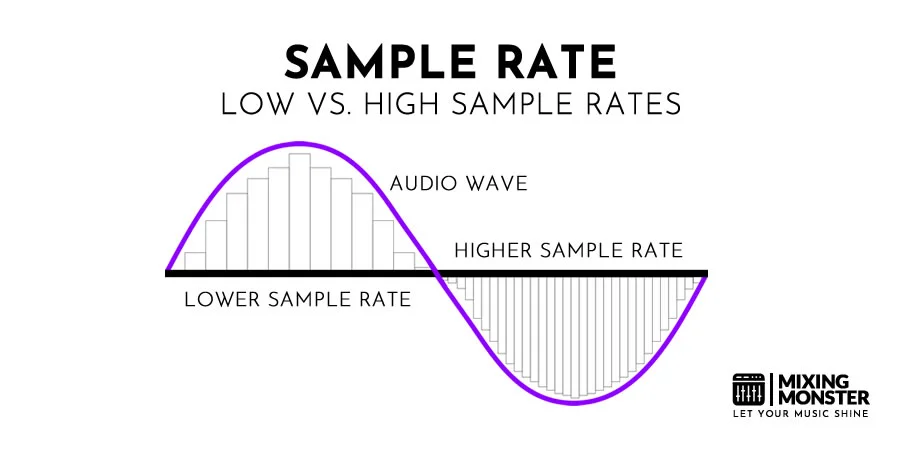
Sample rate describes how often a digital system measures an analog waveform per second. It is expressed in kilohertz (kHz). During sampling, the computer takes snapshots of the audio signal at regular intervals. A rate of 44.1kHz means 44,100 samples are taken every second.
According to the Nyquist-Shannon theorem, the highest frequency that can be captured equals half the sample rate. This boundary is known as the Nyquist frequency. For example, 44.1kHz allows recording up to 22.05 kHz, capturing a frequency range up to 22kHz that safely covers the human hearing range.
Common sample rates include:
|
Sample Rate |
Maximum Frequency Captured |
Typical Use Case |
|
44.1 kHz |
22.05 kHz |
Music, CDs |
|
48 kHz |
24 kHz |
Video, streaming |
|
96 kHz |
48 kHz |
High-resolution audio |
Higher rates like 96 kHz or 192 kHz provide benefits in sound design but increase CPU load. Many audio interfaces support 96khz for capturing ultrasonic frequencies. For most music and video work, 44.1 kHz or 48 kHz is sufficient, as explained in digital audio basics.
Defining Bit Depth
Bit depth determines how many amplitude values can be stored for each sample. More bits provide a finer scale for measuring loudness, improving the signal-to-noise ratio and reducing distortion.
A 16-bit system provides 65,536 possible levels, while a 24-bit system allows over 16 million. This difference translates into greater dynamic range. It is also important to distinguish between bit depth and bit rate, which relate to data transmission. For context:
- 16-bit ≈ 96 dB dynamic range
- 24-bit ≈ 144 dB dynamic range
In practice, 24-bit recording is standard in professional audio because it captures quiet details without introducing unwanted noise. Formats like 32-bit floating point expand headroom further, making them useful in editing and mixing where signals may exceed 0 dBFS without clipping.
Bit depth does not affect frequency response but directly impacts how clean and accurate the amplitude data is.
How Digital Audio Works
Digital audio converts a continuous analog waveform into discrete data. This happens through analog-to-digital conversion using an ADC. This ADC measures the wave's amplitude at intervals defined by the sample rate.
Most digital systems use Pulse Code Modulation, or PCM, to store these measurements. Each sample is quantized into one of the values allowed by the bit depth.
This process creates a binary representation of the sound. For example, at 44.1 kHz and 24-bit, the system captures 44,100 measurements per second, each with over 16 million possible amplitude values.
The combination of sample rate and bit depth defines the resolution of the recording:
- Sample rate → frequency range captured
- Bit depth → dynamic range and noise floor
If the sample rate is too low, aliasing occurs, introducing distortion. If the bit depth is too shallow, quantization noise becomes audible. Together, these parameters determine how faithfully digital audio represents the original sound wave, as outlined in understanding sample rate and bit depth.

2
Sample Rate: Frequency and Audio Quality
The sample rate defines how many times per second an audio signal is measured, directly influencing the accuracy of the captured frequencies. Higher rates allow more detail in the frequency range, while lower rates can limit fidelity and introduce unwanted artifacts.
The Role of Hertz and Kilohertz
Sample rate is expressed in hertz (Hz) or kilohertz (kHz), where 1 kHz equals 1,000 Hz. A rate of 44.1 kHz means the system takes 44,100 samples per second.
The unit of measurement is critical because it determines how finely the waveform is represented. More samples per second give the system more points to reconstruct the audio signal, improving accuracy.
For example:
| Sample Rate | Samples per Second | Unit |
|---|---|---|
| 44.1 kHz | 44,100 | Hz |
| 48 kHz | 48,000 | Hz |
| 96 kHz | 96,000 | Hz |
| 192 kHz | 192,000 | Hz |
This relationship between Hz and kHz enables audio engineers to strike the right balance between audio fidelity and file size.
Nyquist Theorem and Frequency Range
The Nyquist-Shannon theorem states that the sample rate must be at least twice the highest frequency to be captured. Human hearing generally ranges up to 20 kHz, so a minimum of 40 kHz is required to reproduce the full audible spectrum.
A 44.1 kHz sample rate was chosen for CD audio because it comfortably exceeds this requirement. This prevents aliasing, which occurs when higher frequencies fold back into the audible range, creating distortion.
Anti-aliasing filters are applied before conversion to remove frequencies above half the sample rate. This ensures that the digital recording accurately reflects the original analog signal without introducing unwanted tones.
The theorem provides the mathematical foundation for why certain standard sample rates exist in digital audio.
Discover Best Audio Gear & Equipment

Common Sample Rates: 44.1 kHz, 48 kHz, 96 kHz, 192 kHz
44.1 kHz is the standard for CD-quality audio and is widely used for music distribution. It captures frequencies up to about 22khz, providing sufficient coverage of the human hearing range.
48kHz is the broadcast and video standard. Using 48kHz offers slightly more headroom above 20 kHz, which helps with professional synchronization and processing.
96 kHz is often chosen for recording and mixing. The higher rate allows more accurate processing of effects and filters, especially during editing.
192kHz is used in specialized applications such as archival recording and high-resolution audio. While 192 kHz captures extreme detail, it also produces very large files and requires more processing power. Standard rates like 44.1 kHz, 48kHz, and 192kHz each serve different roles in the production chain.
Each rate balances fidelity, storage, and compatibility, making the choice dependent on the intended use case rather than a single "best" option.
3
Bit Depth: Dynamic Range and Detail
Bit depth defines how precisely audio amplitude is captured, which directly affects detail, clarity, and the usable range between the quietest and loudest parts of a signal. It also determines the noise floor and the amount of headroom available during recording and mixing.
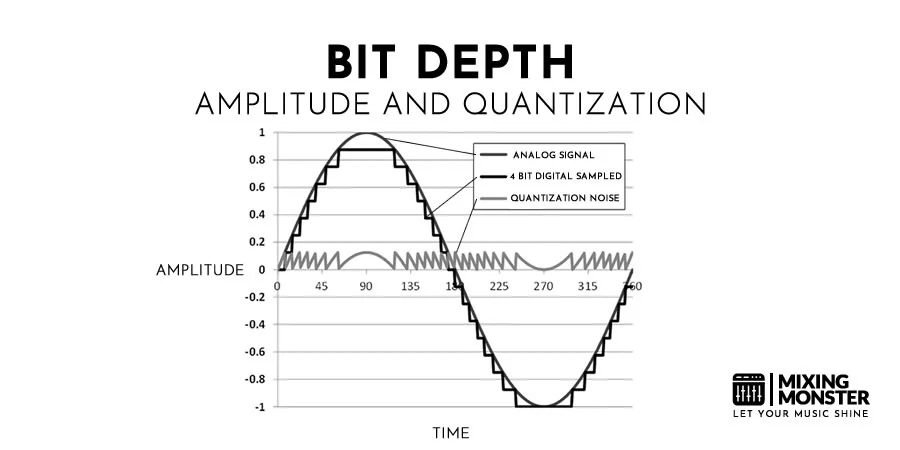
Amplitude and Audio Precision
Bit depth represents the number of bits used to describe the amplitude of each sample. A higher bit depth means more possible values, allowing finer precision when encoding a sound's loudness.
For example:
- 16-bit audio provides 65,536 discrete amplitude levels.
- 24-bit audio provides over 16 million levels.
This precision reduces quantization error, which occurs when rounding sample values to the nearest available step. Lower error results in smoother waveforms and more accurate reproduction of subtle details.
A higher bit depth does not change the frequency range of recording—that is controlled by the sample rate—but it ensures that each captured frequency is represented with greater volume accuracy. This makes bit depth essential for capturing quiet passages without distortion or unwanted artifacts.
Dynamic Range Explained
Dynamic range refers to the span between the softest and loudest sounds that can be represented without distortion. Bit depth sets this limit by defining the number of amplitude steps available.
Each additional bit roughly adds 6 dB of dynamic range. That means:
- 16-bit audio offers about 96 dB of dynamic range.
- 24-bit audio extends this to about 144 dB.
This extended range is especially useful in professional recording, where instruments and voices can vary greatly in loudness. With a wider range, engineers can capture quiet details without sacrificing headroom for louder peaks.
Bit depth directly determines a recording's noise floor and dynamic range, making it one of the most important factors in digital audio quality.
Your Song Mixed & Mastered By Mixing Monster


Noise Floor and Headroom
The noise floor is the level of background noise inherent in a digital system. A higher bit depth lowers this floor, keeping quiet sounds clear rather than masking them with digital noise.
At the same time, headroom is the space between the average signal level and the maximum level before clipping. With more bits, engineers gain additional headroom, making it easier to manage peaks without distortion.
For example, 24-bit recording provides such a low noise floor that even very quiet signals can be recorded cleanly. This is why it is standard in studios, even if the final consumer format is reduced to 16-bit.
The most practical effect of bit depth is its control over dynamic range and noise performance, ensuring recordings remain both detailed and distortion-free.

4
Sample Rate and Bit Depth in Audio Recording
The choice of sample rate and bit depth determines how accurately sound is captured and how much detail is preserved in the recording. These settings directly affect dynamic range, noise floor, and how well the audio holds up during mixing and processing.
Choosing Settings for Recording
When recording, bit depth controls the resolution of amplitude values. A 16‑bit file offers about 96 dB of dynamic range, while a 24‑bit file extends this to 144 dB, making it the standard for professional music production. Higher bit depths reduce quantization noise and provide more headroom for gain adjustments.
Sample rate defines how many times per second the system captures the signal. A 44.1 kHz rate covers the full human hearing range, while 48 kHz is widely used in film and broadcasting. For detailed acoustic instruments or sound design, 96 kHz can reduce aliasing during processing but increases CPU and storage demands.
| Setting | Common Use | Notes |
|---|---|---|
| 16‑bit/44.1 kHz | CD audio, distribution | Sufficient for final delivery |
| 24‑bit/48 kHz | Recording, mixing | Industry standard for most workflows |
| 24‑bit/96 kHz | High‑resolution recording | Useful for detailed instruments, heavy processing |
Choosing 24‑bit with 48 kHz provides the best balance of quality and efficiency for most recording tasks.
Related Articles
Impact on Mixing and EQ
During mixing, higher bit depth ensures quieter elements remain clear when processed with EQ or dynamics. A 24‑bit session allows engineers to apply compression, automation, and effects without introducing unwanted noise or distortion.
Sample rate also affects how plugins handle frequencies. At 48 kHz, the Nyquist frequency is 24 kHz, which is sufficient for most EQ adjustments. However, some effects benefit from 96 kHz because it reduces aliasing. High-resolution settings like 96khz are also beneficial for pitch shifting when manipulating individual stems.
Engineers often use limiters to control peaks during these processes. Applying saturation at higher sample rates can also help maintain the integrity of the sound. These technical choices are vital throughout mixing and mastering to preserve the integrity of the performance.
Still, higher sample rates demand more CPU power. Many plugins already use internal oversampling, so moving beyond 48 kHz often provides little audible benefit. For most mixing sessions, 24‑bit/48 kHz remains the practical standard, while 96 kHz is reserved for projects requiring extreme precision.

5
Standard Formats and Bit Depth Options
Digital audio formats vary in bit depth and file type, each offering trade-offs between quality, file size, and flexibility. The choice depends on whether the priority is efficient storage, professional editing headroom, or compatibility with playback systems.
16-Bit audio vs 24-Bit Audio
16-bit audio is the standard for CDs and many consumer formats. It provides a dynamic range of about 96 dB, which is sufficient for most listening environments. This makes distribution more efficient, since file sizes remain relatively small.
24-bit audio expands the dynamic range to about 144 dB. This allows for more detail in quiet passages and greater headroom when recording or mixing. In practice, this reduces the risk of clipping and noise during processing in a digital audio workstation (DAW).
Most professional recording sessions use 24-bit audio to preserve quality during editing and mixing. However, final exports often get converted back to 16-bit. This process usually requires engineers to use dithering to maintain audio quality.
Effective dithering helps mask the noise introduced by bit discarding. Proper use of dither is a standard step in mixing and mastering when preparing files for distribution. Applying dither prevents artifacts that occur when a digital signal is truncated.
| Bit Depth | Dynamic Range (approx.) | Common Use Case |
|---|---|---|
| 16-bit | 96 dB | CDs, streaming |
| 24-bit | 144 dB | Recording, mixing |
32-Bit Float and Professional Applications
32-bit float audio offers an even more flexible format, primarily used in professional recording and post-production. Unlike fixed bit depths, floating point allows extremely high headroom, making it nearly impossible to clip during recording.
This format is especially useful in film production, live recording, and complex sound design. Engineers can recover audio that might otherwise distort in 16-bit or 24-bit formats.
While 32-bit float files are larger, they provide unmatched safety during unpredictable recording conditions. Many modern DAWs support this format, but it is rarely necessary for consumer playback. Instead, it serves as a working format for professionals who need maximum editing precision.
WAV and Other File Types
WAV files remain the most common uncompressed audio format. They support 16-, 24-, and 32-bit floating-point formats, making them versatile for both consumer and professional use. Their lack of compression ensures no loss of quality, though file sizes are larger.
Other formats, such as AIFF, function similarly to WAV and are often used in Mac-based workflows. Compressed formats such as MP3 or AAC reduce file size but discard audio data, making them unsuitable for editing.
For professional recording and mixing, WAV or AIFF at 24-bit or 32-bit float is standard. For distribution, files are usually converted to 16-bit WAV, MP3, or AAC, depending on playback needs and storage requirements.

6
Practical Applications and Best Practices
Different recording scenarios demand different choices for sample rate and bit depth. File size, playback compatibility, and the intended use of the audio all influence which settings are most effective. Careful selection helps ensure recordings remain both high quality and manageable during production and mixing.
Selecting Appropriate Settings for Your Project
When recording music, engineers often choose 44.1 kHz / 16-bit for projects intended for CD distribution, since this is the standard playback format. For film and video, 48 kHz / 24-bit is more common because it aligns with broadcast and video standards.
Higher settings, such as 96 kHz / 24-bit, provide more headroom for mixing and processing. This can be useful in professional studios where detailed editing and heavy effects processing are performed. However, not every project benefits from extreme settings like 192 kHz / 32-bit float, since the additional fidelity may not translate to the final medium.
For home studios, selecting 24-bit recording at 44.1 or 48 kHz balances quality with efficiency. According to best practices in recording, using excessively high values often leads to unnecessary storage demands without noticeable improvements for most listeners.
Balancing Quality and File Size
Sample rate and bit depth directly affect file size. For example, doubling the sample rate nearly doubles the storage required. A 2-second sine wave at 192 kHz / 32-bit float can already reach more than a megabyte, and real-world recordings grow much larger.
Producers should weigh whether the project requires long recording sessions, multiple takes, or layered tracks. In these cases, using 24-bit depth at moderate sample rates avoids overwhelming storage while still capturing clean audio.
For streaming on platforms like Spotify, audio is often distributed in formats measured in kbps to save bandwidth. A bit rate of 320 kbps is common for high-quality audio files, ensuring fidelity without excessive data consumption.
A simple comparison of typical settings:
| Setting | File Size Impact | Common Use Case |
|---|---|---|
| 44.1 kHz / 16-bit | Small | CD audio, MP3 distribution |
| 48 kHz / 24-bit | Moderate | Film, video, podcasts |
| 96 kHz / 24-bit | Large | Professional mixing, archiving |
Choosing wisely ensures smooth editing and reduces strain on storage and processing power.
Avoiding Common Pitfalls
One common mistake is recording at unnecessarily high settings and then downsampling later. This can waste resources without offering audible benefits. Instead, engineers should match the recording format to the final delivery medium whenever possible.
Another issue is ignoring gain staging. Even with high bit depth, clipping can occur if input levels are set too high. Using 24-bit depth allows for more headroom, but poor level management still results in distortion.
Finally, beginners often overlook playback compatibility. Some devices and software struggle with very high sample rates. Sticking to widely supported formats like 44.1 kHz / 16-bit or 48 kHz / 24-bit ensures smooth playback across platforms.
Consistent monitoring of levels, storage, and compatibility avoids wasted effort and maintains reliable audio quality throughout the production process.

7
Advanced Considerations in Digital Audio
Digital audio quality depends not only on sample rate and bit depth but also on how the system handles unwanted frequencies, format conversions, and evolving playback standards. Technical choices in these areas influence clarity, compatibility, and efficiency across recording, mixing, and distribution.
Aliasing and Oversampling
Aliasing occurs when audio is sampled at a rate too low to capture higher frequencies accurately. These frequencies fold back into the audible range, producing distortion that cannot be removed once recorded. To prevent this, engineers use anti-aliasing filters and higher sample rates that exceed the Nyquist frequency.
Oversampling is another strategy. By internally multiplying the sample rate in a digital audio workstation (DAW) or plugin, oversampling reduces aliasing artifacts during processing, such as distortion, synthesis, or dynamics control.
For example:
| Method | Purpose | Effect on Audio Quality |
|---|---|---|
| Higher Sample Rate | Captures more frequency detail | Reduces aliasing but increases file size |
| Oversampling | Improves plugin processing | Cleaner high-frequency response |
These techniques are especially important in mastering and sound design, where subtle artifacts become noticeable.
Resampling and Compatibility
Resampling changes the sample rate of an audio file, often to match playback systems or project requirements. A track recorded at 96 kHz may need to be converted to 44.1 kHz for distribution on streaming platforms.
Poor resampling can introduce artifacts such as phase distortion or loss of transient detail. High-quality resampling algorithms in DAWs and dedicated tools minimize these issues by applying precise interpolation and filtering.
Compatibility also matters when exchanging files between systems. A session created at 48 kHz in one DAW may not align correctly in another if resampling is handled incorrectly. Consistency in both sample rate and bit depth ensures smooth collaboration and prevents timing or pitch errors.
Future Trends in Audio Technology
Audio technology continues to evolve, with higher-resolution formats and more efficient workflows. Some platforms already support 32-bit floating-point recording, which offers virtually unlimited headroom and reduces the risk of clipping during capture.
Streaming services are also experimenting with adaptive formats that adjust quality based on bandwidth while maintaining transparency at lower bitrates. This requires flexible handling of sample rate and bit depth during encoding.
Another trend is the integration of machine learning in resampling and noise reduction. Advanced algorithms can produce cleaner results than traditional methods, especially when upscaling audio or restoring old recordings.
Emerging standards suggest that higher sample rates may become more common in professional production, though practical file size and processing limits remain important considerations.
8
Key Takeaways For Understanding Sample Rate And Bit Depth
The sample rate defines how often audio is captured per second. A higher rate allows more detail, but it also increases file size and processing demands. Common values include 44.1 kHz for music and 48 kHz for video.
Bit depth determines the number of possible values for each sample. A higher bit depth increases dynamic range, reducing noise and distortion. Standard formats often use 16-bit, while professional work may use 24-bit.
Key differences:
| Aspect | Sample Rate | Bit Depth |
|---|---|---|
| Measures | Frequency detail | Amplitude resolution |
| Typical Use | 44.1 kHz for music | 16-bit for CDs |
| Higher Value | Captures more frequencies | Wider dynamic range |
They work together to shape audio quality. A high sample rate alone cannot improve recordings if bit depth is too low, and vice versa.
In most situations, 44.1 kHz/16-bit is sufficient. Higher settings, such as 96 kHz / 24-bit, are useful in professional audio production.
Choosing the right combination depends on the project. Music streaming often favors smaller file sizes, while film scoring or mastering may benefit from higher-resolution settings.

Frequently Asked Questions
1
What are the implications of higher bit depth on audio quality?
A higher bit depth increases the dynamic range of a recording. For example, 16-bit audio offers about 96 dB, while 24-bit audio provides around 144 dB. This allows recordings to capture quieter details without introducing noise or distortion.
2
How does sample rate affect the fidelity of digital audio recordings?
Sample rate determines how many times per second a sound wave is measured. According to the Nyquist-Shannon theorem, the rate must be at least twice the highest frequency being recorded. Higher sample rates can improve frequency response and reduce aliasing, though the audible difference may be subtle.
3
Can human ears distinguish the difference between various sample rates and bit depths?
Most people cannot reliably hear differences between 44.1 kHz and higher rates, such as 96 kHz, under normal listening conditions. However, trained listeners in controlled environments may notice subtle improvements. Bit depth differences are more perceptible, especially when comparing 16-bit to 24-bit during mixing and mastering.
4
What are the standard sample rates and bit depths used in professional music production?
Common professional settings include 24-bit depth with sample rates of 44.1 kHz, 48 kHz, or 96 kHz. CD audio uses 16-bit/44.1 kHz, while film and broadcast media often use 48 kHz. High-resolution projects may use 96 kHz or even 192 kHz when storage and processing power allow.
5
How do sample rate and bit depth impact the size of an audio file?
Increasing either parameter raises the file size. For instance, moving from 16-bit to 24-bit increases the data captured per sample, while doubling the sample rate doubles the number of samples per second. Larger files demand more storage and greater processing power during editing and playback.
6
What considerations should be made when choosing sample rate and bit depth for a recording project?
The decision depends on the project's purpose, playback format, and system capacity. For streaming or CDs, 44.1 kHz at 16-bit may be sufficient. For professional mixing, 24-bit with a higher sample rate, such as 96 kHz, is often recommended. Storage space, CPU performance, and audio interface compatibility should also be evaluated.